Central Kitchen
Central purchasing
One buyer, one order per supplier, distributed to the outlets that asked.
2 min read · Last reviewed 23 Oct 2026
Central purchasing mode changes who orders. Instead of each outlet ordering for itself, outlets raise requests and a central purchasing unit fills them — buying, sending from the central kitchen's store, or having the kitchen make it.
How it runs
- Outlets raise purchase requests as normal.
- The buyer opens Process Requests (from the Requests tab), picks the purchasing unit, and decides how each approved line is filled: bought to the outlet, bought into the store, sent from the store, made by the kitchen, or not supplied.
- Raise documents creates one draft purchase order per supplier and delivery point — the same ingredient across outlets merged into one line — plus the store transfers and production orders.
- Goods bought into the store are sent on to the outlets that asked for them when they arrive. See Process requests.
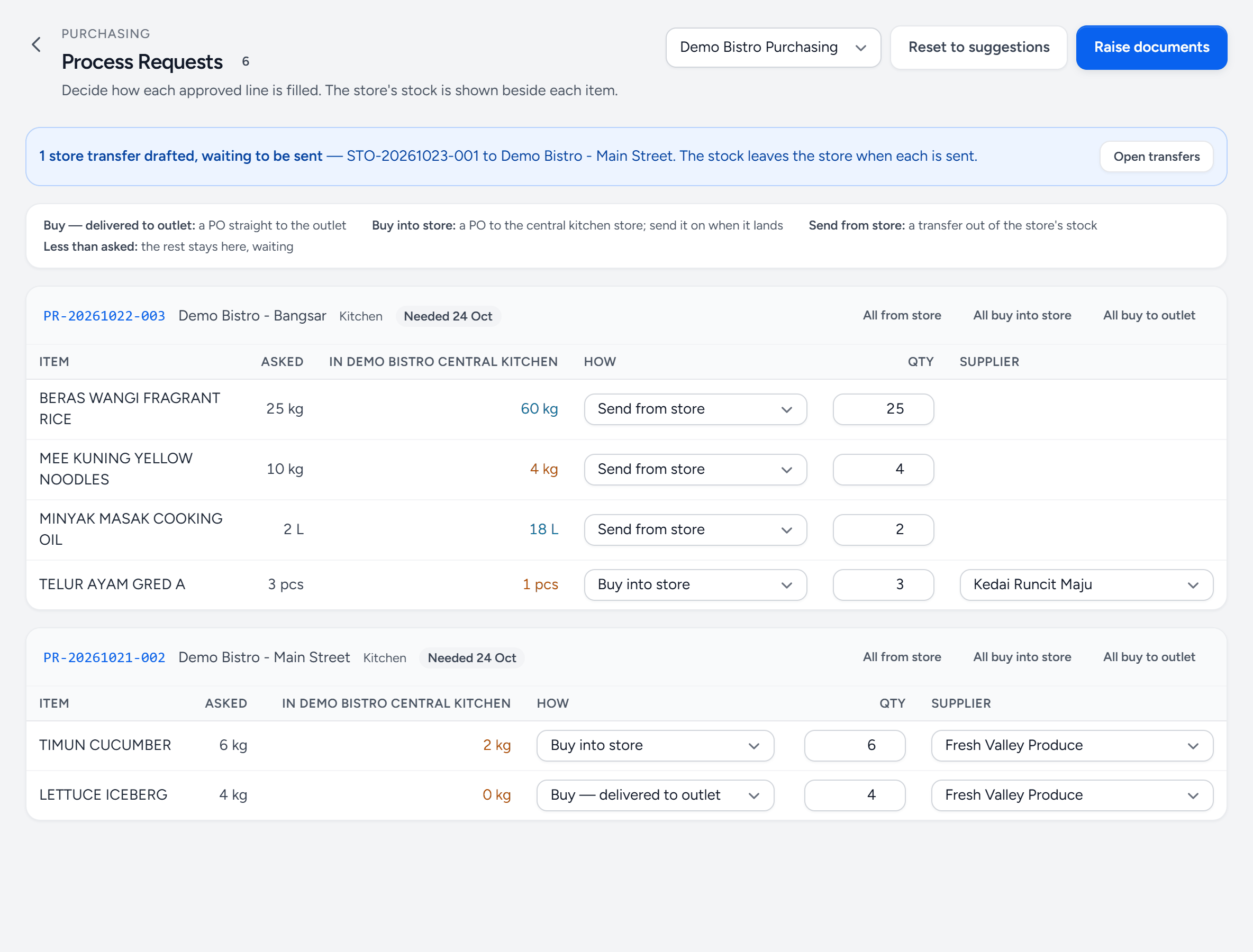
- Purchasing unit — which unit places these orders. Whether it takes deliveries itself decides what buying suggests.
- A request — the outlet, the department and when it is needed by.
- In the store — what the central kitchen's store holds now. Green covers what was asked; amber does not.
- How — how this line is filled. Servora suggests one; change it.
- Supplier — who to buy from, for every line you buy.
- Raise documents — the draft orders, store transfers and production orders, in one go.
Why bother
Volume. Four outlets each ordering 20 kg of onions get four small-order prices; one order for 80 kg gets one better price. It also means one relationship per supplier instead of four, and one place where a price rise is noticed.
Turning it on
Create the purchasing unit under Settings → Central Purchasing — its address and whether suppliers deliver to it or straight to the outlets — then set Ordering Mode under Settings → PO Approvers. To send from a store, give the central kitchen a Base Outlet under Settings → Central Kitchen: that outlet's stock is the store. With a unit in charge, only Purchasing writes orders; outlets see them read-only. Switch it deliberately: it changes who raises orders, and outlet managers need to know that their request now goes to a buyer rather than a supplier.
Keeping the outlets honest
Consolidated buying only works if outlets request what they actually need. Par levels help — a request generated from par is a calculation, and a request typed from memory on a Friday afternoon is not.
Still stuck?
Tell us what you were trying to do — a person on our team will reply. If this guide is missing a step or out of date, say so and it gets fixed in the manual, not just in an email.