Central Kitchen
Production orders
Plan what to make, record what was actually made, and see the yield.
4 min read · Last reviewed 23 Oct 2026
The four steps
- Production order — what to make, how much, by when, and which outlet it is for.
- Production log — what was actually made, and what it consumed.
- Stock transfer — sent to the outlet.
- Outlet receives — the stock lands and the cost follows it.
Raising an order
- On the Kitchen screen, press Production Order. In the kitchen workspace the order starts on the kitchen you are in.
- Set the production date and when it is needed by.
- Add a line per recipe: what to make, how much, and the destination outlet — or press Suggest from par (below).
- Save. It starts as a draft; Schedule it when it is ready to be made.
Orders can also come from the outlets — an outlet raises a prep request and the kitchen turns approved requests into production orders.
Suggest from par
For each item the kitchen makes that has a par, Suggest from par adds what brings it back up:
par − what is in Kitchen Inventory − what is already scheduled on the kitchen's open production orders, rounded up to 0.1.
Par 30 kg, 8 kg in Kitchen Inventory and 10 kg already scheduled: it suggests 12 kg. Press it again after a change and the quantities update — nothing is added twice. When everything is at par it says there is nothing to suggest. It is a suggestion, never an order: the chef checks the quantities and saves.
The pars are the kitchen's own, under Settings → Par Levels, which in the kitchen workspace opens on the kitchen's outlet. An item counts when the kitchen has a recipe that makes it.
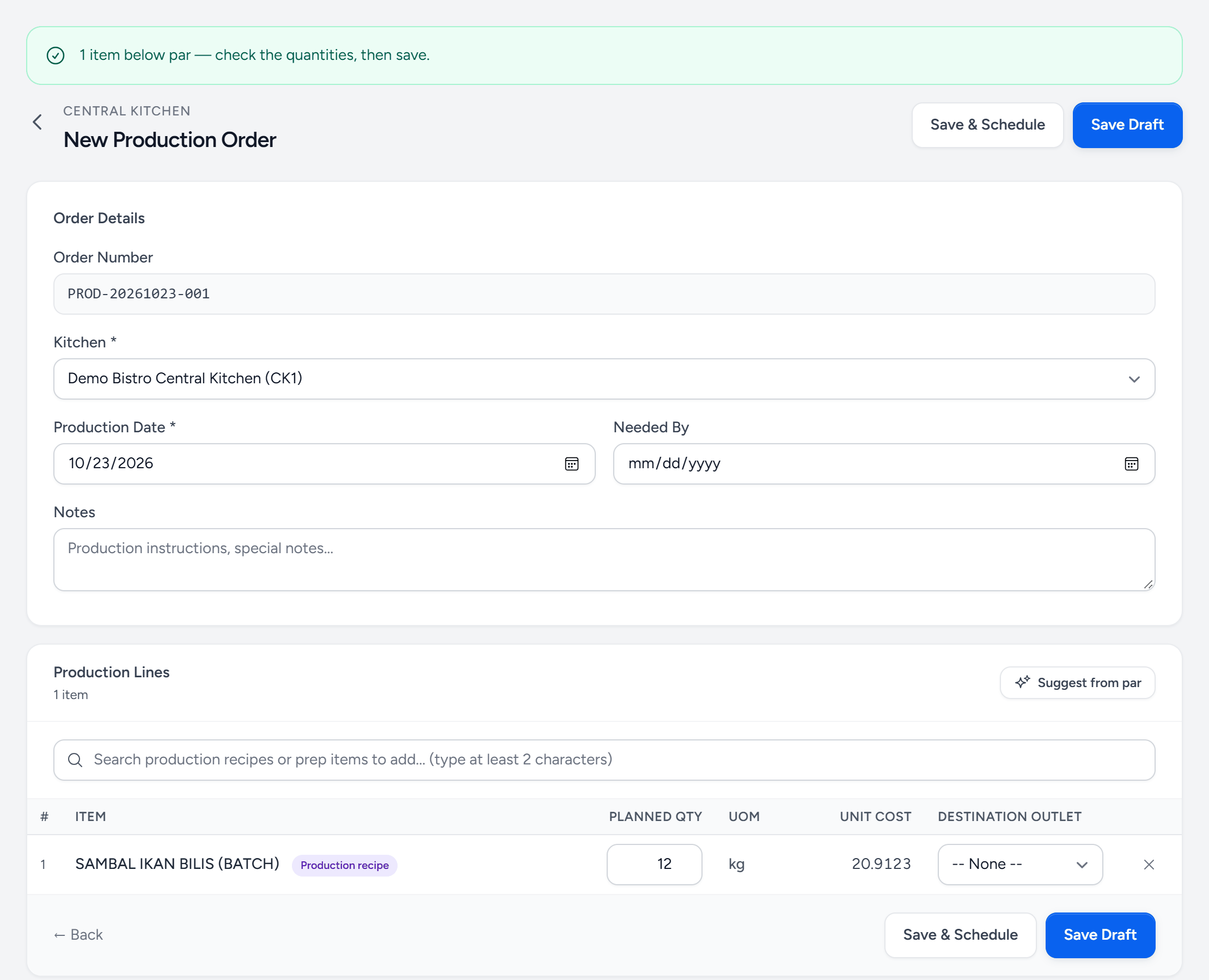
- Below par — how many items were suggested. Check them, then save.
- Kitchen — the kitchen you are in. The pars are this kitchen's.
- Suggest from par — press again after a change; quantities update and nothing is added twice.
- The item — made by a production recipe, for an item with a par at the kitchen.
- Planned qty — here a par of 80 kg, less 8 kg in Kitchen Inventory, less 60 kg already scheduled: 12 kg.
- Save & Schedule — nothing is planned until you save.
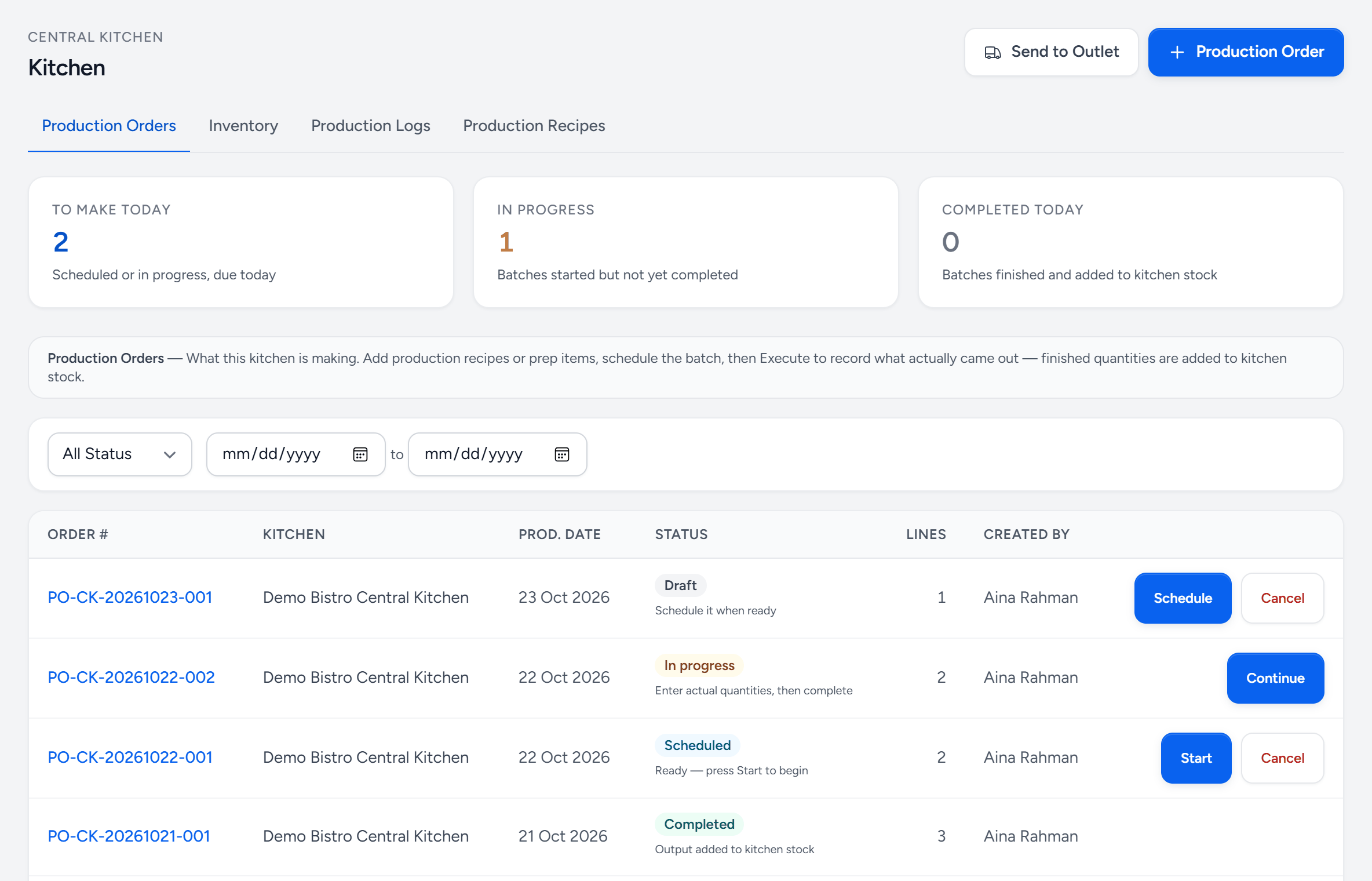
- Production Order — plan a new batch.
- To make today — scheduled or started, due today.
- In progress — started and not yet finished.
- Completed today — finished and in kitchen stock.
- Schedule — a draft becomes a plan the kitchen will make.
- Start — the batch has begun.
- Continue — enter what actually came out, then complete it.
- Completed — the output is in kitchen stock, ready to send.
Executing
Press Start when the batch begins and Continue to record it: the quantity actually produced, and the ingredients actually consumed. Completing it adds the output to kitchen stock. Both are asked for, because the difference between them is the yield, and yield is the only reason to track any of this.
What production does to the store's stock
Completing a production order also records it at the kitchen's store — the stock of the kitchen's Base Outlet:
- Ingredients out — each ingredient of the recipe, scaled to what was actually made, with each line's waste allowance on top. A 10 kg recipe that uses 6 kg of flour, with 5 kg made and no waste allowance, uses 3 kg of flour.
- Prep items and packaging — a prep item in the recipe is taken from stock as it is, since the kitchen made it earlier; it is not broken back into its own ingredients. Packaging is used up too.
- The item made in — the batch goes into the store's stock.
Stock on hand, Reports → Stock Balance (a Production column, in the CSV too), the Stock Card (PROD-MADE and PROD-USED lines) and Usage Variance all count it. A batch sent on to an outlet leaves the store as it came in, so the store nets to zero instead of going negative.
Only orders completed from 23 October 2026 are recorded. Earlier production left no movements, so the store's figures settle from its next stock take.
Yield analysis
A 40 kg batch of sambal that produced 38.6 kg ran at 96.5%. One batch means nothing; the same recipe at 96% for three months and 88% last week means something, and Insights → Yield Analysis is where that shows up.
Sustained low yield is usually one of three things: the recipe's stated yield is optimistic, the ingredients changed, or the method drifted. All three are worth finding.
Costing
The cost of a batch is what it consumed, at today's ingredient prices, divided by what it produced. That per-kilo cost is what transfers to the outlet — so an outlet's food cost includes the kitchen's real cost, not a standard price somebody set last year.
A batch sent to a branch owned by a separate company is also invoiced to that company, at the same cost and with no tax. See Branches owned by a separate company.
Still stuck?
Tell us what you were trying to do — a person on our team will reply. If this guide is missing a step or out of date, say so and it gets fixed in the manual, not just in an email.