Getting started
Working across outlets
What the outlet switcher changes, what it does not, and how stock moves between locations.
2 min read · Last reviewed 22 Oct 2026
An outlet is a physical location: a restaurant, a kiosk, a central kitchen. Almost everything in Servora belongs to one.
Choosing an outlet
There is no outlet to switch into. Each screen has an Outlet filter in its filter strip — all your outlets together, or one — and each form asks which outlet the record is for. That changes what you are looking at: the orders, the stock, the roster, the sales. It does not change what you are allowed to do; your role travels with you.
You only see outlets you have been given access to. If you need another one, a Company Admin grants it under Settings → Roles & Access.
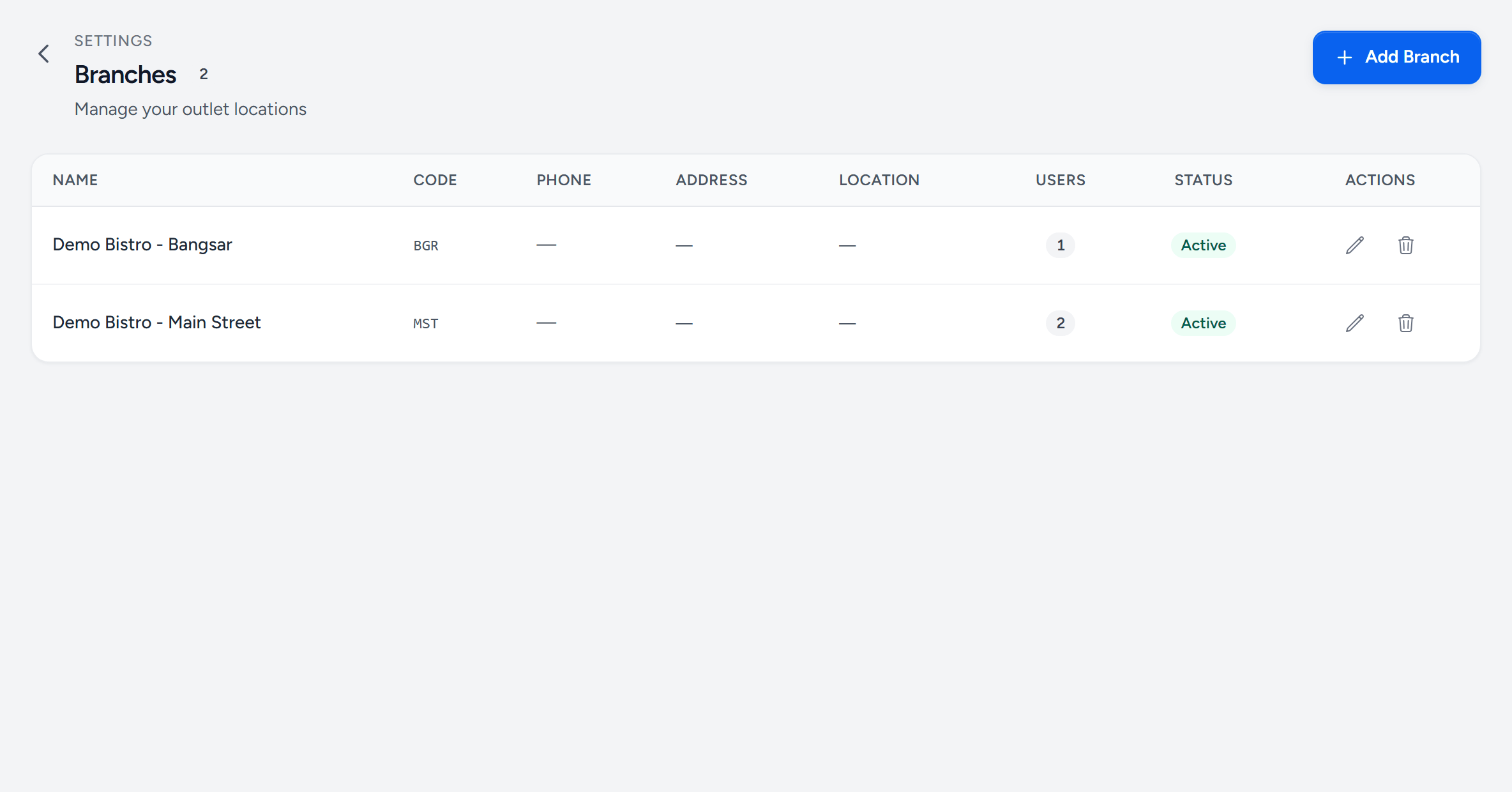
- Add Branch — a new outlet, kiosk or central kitchen.
- An outlet — its name is what every Outlet filter and form shows.
- Users — how many people have been given this outlet.
- Status — an inactive outlet keeps its history but drops out of the pickers.
- Actions — edit the name, code, phone and address that print on its documents.
What is shared and what is not
| Shared across the company | Per outlet |
|---|---|
| Ingredients and their costs | Stock on hand |
| Recipes and prep items | Purchase orders and deliveries |
| Suppliers | Sales records and targets |
| Employees and payroll | Rosters and attendance |
| Label templates and shelf-life rules | Labels actually printed |
The split follows a simple rule: definitions are company-wide, events are per outlet. A recipe is a definition. Cooking it is an event.
Moving stock between outlets
Use Transfers → New Stock Transfer. A transfer has two ends and both have to act: the sending outlet creates and sends it, the receiving outlet confirms what actually arrived. Until the second half happens the stock is in transit and belongs to neither — which is exactly what you want a variance report to tell you.
Companies, not just outlets
If you operate more than one legal entity, each is a separate company with its own outlets, users, subscription and data. Switch companies from the company name at the bottom of the sidebar. Nothing crosses between them.
Still stuck?
Tell us what you were trying to do — a person on our team will reply. If this guide is missing a step or out of date, say so and it gets fixed in the manual, not just in an email.