Getting started
Roles and permissions
Who can see what, how roles are assigned, and why a menu item might be missing.
4 min read · Last reviewed 22 Oct 2026
Every user has a role, and the role decides which screens they can open and which buttons they get on those screens. Roles are per company: the same person can be a Branch Manager at one company and a Chef at another.
The roles that ship
Each role also decides which outlets its holder reaches: Company Wide roles cover every outlet, Outlet roles only the ones ticked for them, and HQ roles all outlets, all except some, or a chosen few.
| Role | Reach | Can do |
|---|---|---|
| Company Admin | Company Wide | Everything in the company, including users, billing and settings. |
| Operations Manager | Company Wide | Runs operations across every outlet: purchasing, inventory, recipes, sales and reports. |
| Branch Manager | Outlet | Their outlets: sales, purchasing, inventory, duty roster and reports. |
| Chef | Outlet | Recipes, ingredients, inventory and purchasing at their outlets. |
| Central Kitchen Manager | Outlet | What an Operations Manager does, for the central kitchens picked for them. |
| Finance | HQ | Pays claims and petty cash, supplier invoices, stock take results, purchase and sales reports. |
| Human Resources | HQ | The HR module, including pay, service charge and payslips. Reads the duty roster. |
| Purchasing | HQ | Purchase requests and orders, transfers and suppliers. |
| Owner (View Only) | HQ | Sees the numbers and changes nothing. See below. |
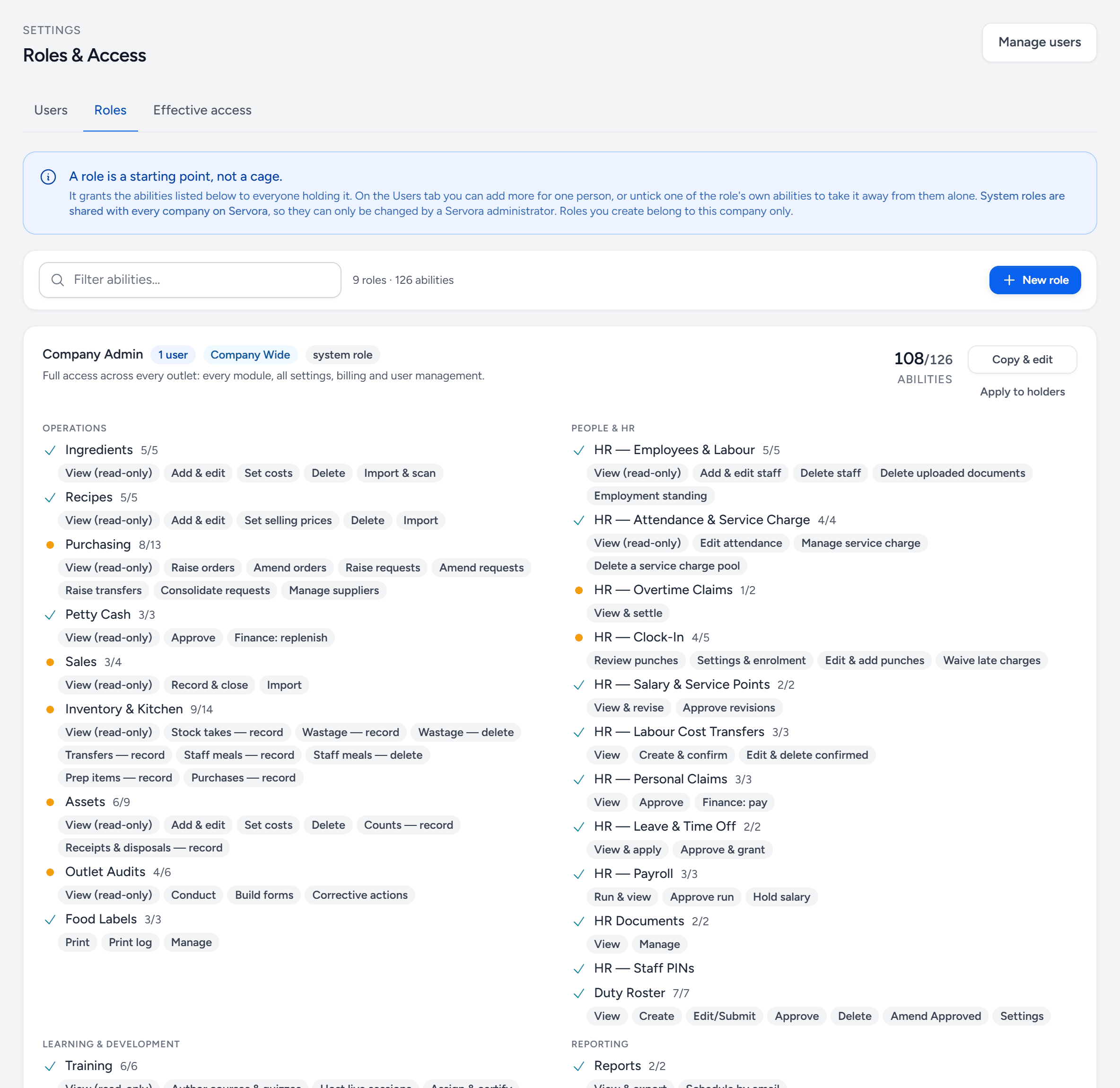
- Users — each person, their role and their outlets. Add someone, or change what one person can do.
- Effective access — pick a person and see what they can actually do, after their role and any changes made for them alone.
- New role — build your own role when none of the shipped ones fits.
- The role — its name, how many people hold it, and what it is for.
- Reach — Company Wide, Outlet or HQ — which outlets its holders see.
- Copy & edit — shipped roles cannot be changed; copy one and change the copy.
- Abilities by module — a tick means the role has all of them, an amber dot means some. The chips underneath are each ability.
Owners, directors and shareholders: Owner (View Only)
For people who own or invest in the business but are not in it day to day. They see the figures and cannot change, approve or delete anything.
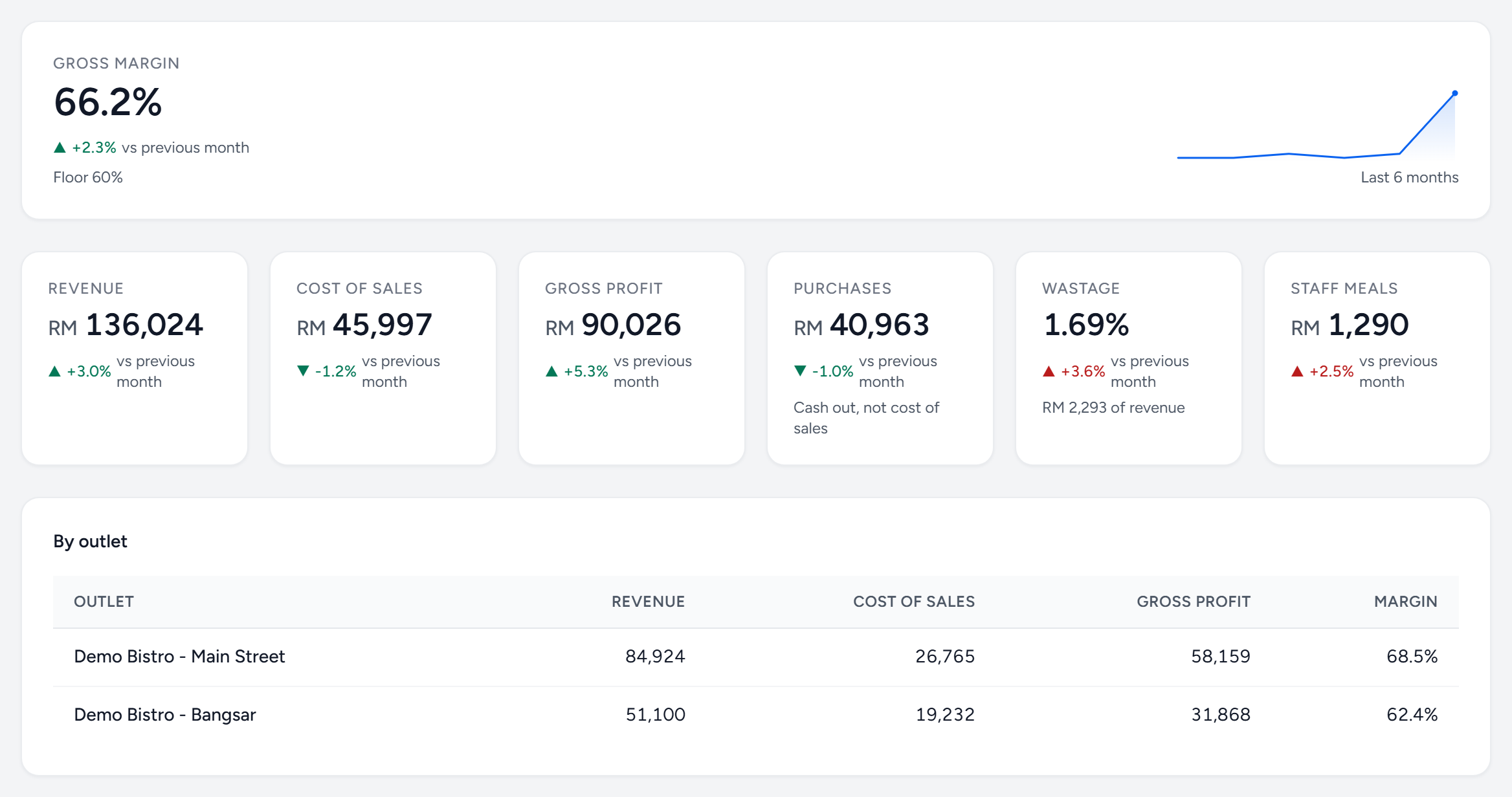
- They see: sales, every report (cost of goods, food cost, menu engineering, wastage, purchases, stock), recipe costings and selling prices, ingredient costs, purchase orders and supplier invoices, the asset register and outlet audit results. Their dashboard shows revenue, cost of sales, gross profit and margin, split by outlet.
- They do not see: pay, staff records, petty cash or claims queues.
- They can ask Claude or ChatGPT about the business through Servora MCP, which only ever reads.
- Outlets: give them every outlet, or just the ones they have a stake in.
- Weekly figures by email: a Company Admin sets up a scheduled report under Settings → Scheduled Reports with the owner as a recipient.
To set one up: Settings → Roles & Access, add or edit the person, tick Owner (View Only) under HQ and pick their outlets. Abilities that change anything are greyed out for this role. Someone who needs to do one thing as well needs a different role, or Custom.
Your company may have its own roles on top of these — a System Admin can build them from a role template.
"My colleague has a menu I don't have"
That is permissions, not a different version. A sidebar group is hidden entirely when you cannot open anything inside it, which is why the difference looks bigger than one missing link. Ask a Company Admin to check your role under Settings → Roles & Access.
Approvals are separate from roles
Being a manager does not automatically make you an approver. Purchase request approvers, purchase order approvers, overtime approvers and leave approvers are each configured as their own list, under the relevant module's settings. This is deliberate: the person who signs off spend is often not the person who signs off leave.
Outlet access
Separately from the role, each user is granted access to specific outlets. A Branch Manager with one outlet sees one; an Operations Manager sees them all and can switch between them. The role decides which shapes are allowed, as above.
Still stuck?
Tell us what you were trying to do — a person on our team will reply. If this guide is missing a step or out of date, say so and it gets fixed in the manual, not just in an email.