Inventory
How stock on hand is worked out
What moves your stock up and down, and why the number drifts if the team skips a step.
2 min read · Last reviewed 23 Oct 2026
Servora keeps a running figure for every ingredient at every outlet. It is arithmetic, not magic, and it is only right if every movement gets recorded.
What moves it up
- Goods received — the main one. Only what arrives in good condition counts.
- Transfers in from another outlet or the central kitchen, once received.
- Production — at a central kitchen's store, what a completed production order made.
- A stock take, which does not move the figure so much as replace it.
What moves it down
- Sales — through the recipe. Sell forty nasi lemak and Servora deducts forty portions' worth of each ingredient.
- Wastage you record.
- Staff meals you record.
- Transfers out.
- Consumption by production — at a central kitchen's store, the ingredients a completed production order used, scaled to what was made.
Production shows in its own Production column on Stock Balance (and its CSV), and as PROD-MADE and PROD-USED lines on the Stock Card. See Production orders.
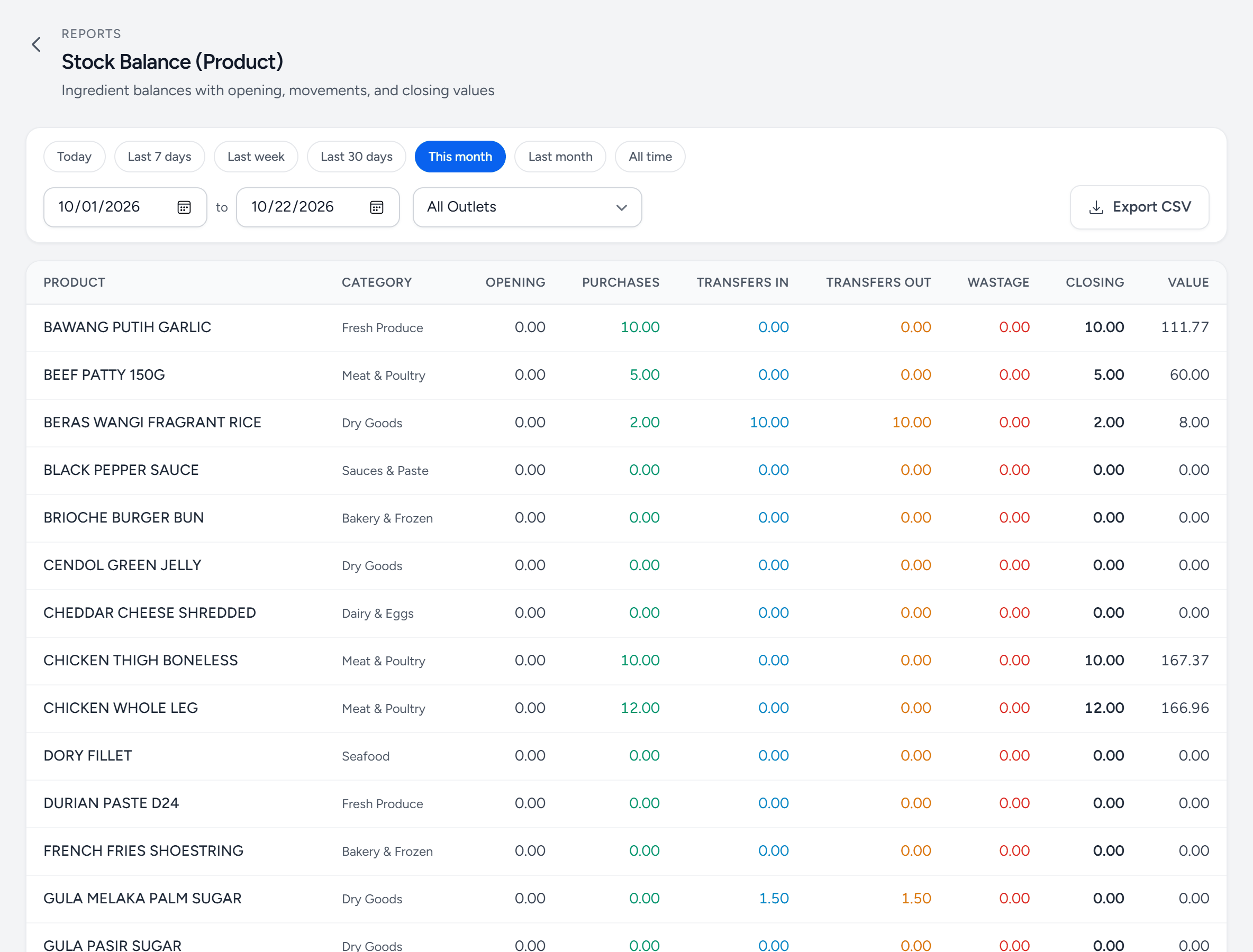
- Outlet — one outlet, or all of them together. The dates above it set the period.
- Opening — the last stock take before the period started.
- Purchases — what was received.
- Transfers In — stock that arrived from another outlet.
- Transfers Out — stock sent to another outlet.
- Wastage — what was recorded as thrown away.
- Closing — opening plus everything in, less everything out.
- Value — the closing balance at today's cost.
Where the drift comes from
If counted stock is consistently below system stock, one of these is happening and it is almost always the first:
- Wastage is not being recorded. Trim, spoilage and mistakes leave the store with no document.
- Yield percentages are optimistic. If the system thinks 100% of a chicken is usable, every portion quietly eats more than it is charged for.
- Transfers were sent but never received at the other end.
- Sales are not synced, so nothing has been deducted at all.
Chase it in that order. A stock take tells you the size of the gap; only one of those four tells you the cause.
Still stuck?
Tell us what you were trying to do — a person on our team will reply. If this guide is missing a step or out of date, say so and it gets fixed in the manual, not just in an email.