Inventory
Run a stock take
Count what is actually there, see the variance against what the system expected, and act on it.
2 min read · Last reviewed 22 Oct 2026
A stock take replaces the system's figure with a counted one, and tells you how far apart they were. Until you have done one, your food cost is an estimate.
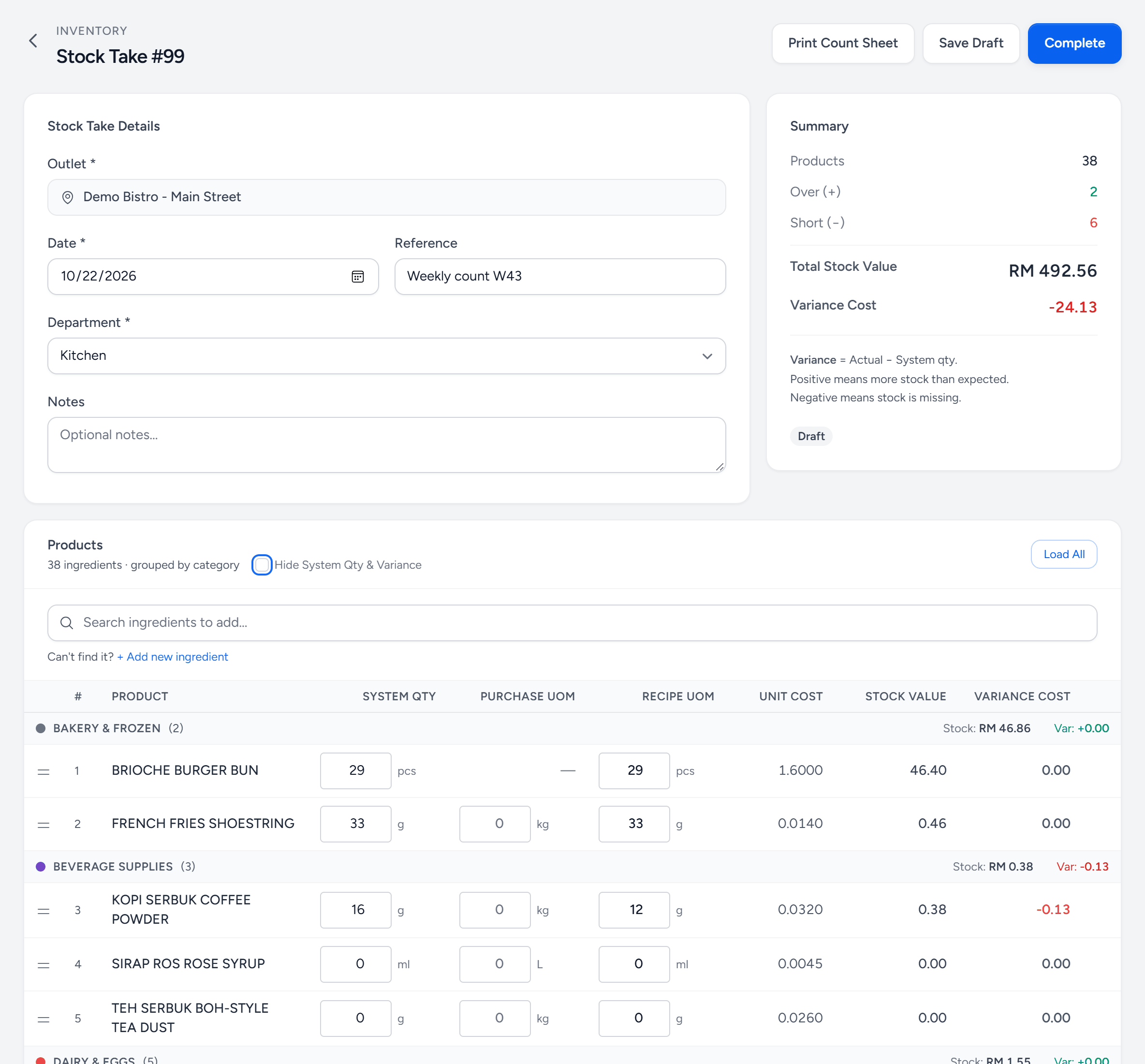
- Print Count Sheet — a sheet to count on, without the expected quantities.
- Complete — makes this count the outlet's stock on hand.
- Blind count — ticked, the system quantity and variance stay hidden while you count.
- Load All — adds every active ingredient, grouped by category.
- System Qty — what Servora expected to find.
- Counted — what is actually there, in the recipe unit. Full packs go in the purchase unit beside it.
- Variance Cost — counted minus expected, at cost. Red is missing.
- Over and short — how many lines came out over and under, and the total variance.
Before you start
- Receive every delivery that has arrived.
- Post every transfer, both ends.
- Enter the day's sales.
- Count when nothing is moving — before service or after close.
Counting mid-service produces a variance that measures nothing except how busy you were.
Counting
- Inventory & Recipes → Stock Management → New Stock Take. Pick the outlet, the department, the date, and whether you are counting in detail (line by line) or entering one summary amount. Load All lists every active ingredient.
- Work through the list in the order you walk the store — not alphabetically. Set your product categories up to match your physical layout and this takes half the time.
- Enter what you count. Counters work blind by default — the system quantity is hidden, so nobody copies it down. Print Count Sheet gives the team a paper sheet in the same order.
- Save Draft as you go. A part-finished count survives being closed.
- Complete when it is done. Lines still at 0 are dropped then, so an item you did not count is not recorded as empty.
Reading the variance
| Pattern | Usually means |
|---|---|
| One item badly short, the rest fine | Theft, or a transfer nobody recorded. |
| Everything a little short | Yield percentages are too generous. |
| Everything a little over | Portioning is under spec, or sales are not fully synced. |
| High-value items short | Worth investigating today, not at month end. |
How often
Full count monthly, at minimum — you cannot close a month's food cost without one. A weekly count of your top twenty items by value catches most problems while they are still small.
Still stuck?
Tell us what you were trying to do — a person on our team will reply. If this guide is missing a step or out of date, say so and it gets fixed in the manual, not just in an email.