Purchasing
Receive a delivery
The GRN is the most important document in the system. What to check, and what it changes.
3 min read · Last reviewed 23 Oct 2026
Receiving is where the system finds out what really happened. Do it at the door, with the delivery in front of you — not from the invoice a week later.
Where deliveries wait
When an order is approved, its delivery opens straight away: a goods received note (GRN) with every line expected. In the Staff Portal it is under Deliveries, today's first. In the back office it is Procurement → Orders & Requests → Goods Received (GRN).
Anyone listed at the outlet can receive in the Staff Portal, with wet or gloved hands. They see quantities, never prices.
Stock sent from the central kitchen's store is listed above the supplier deliveries, under From the central kitchen, and is received the same way. See Process requests.
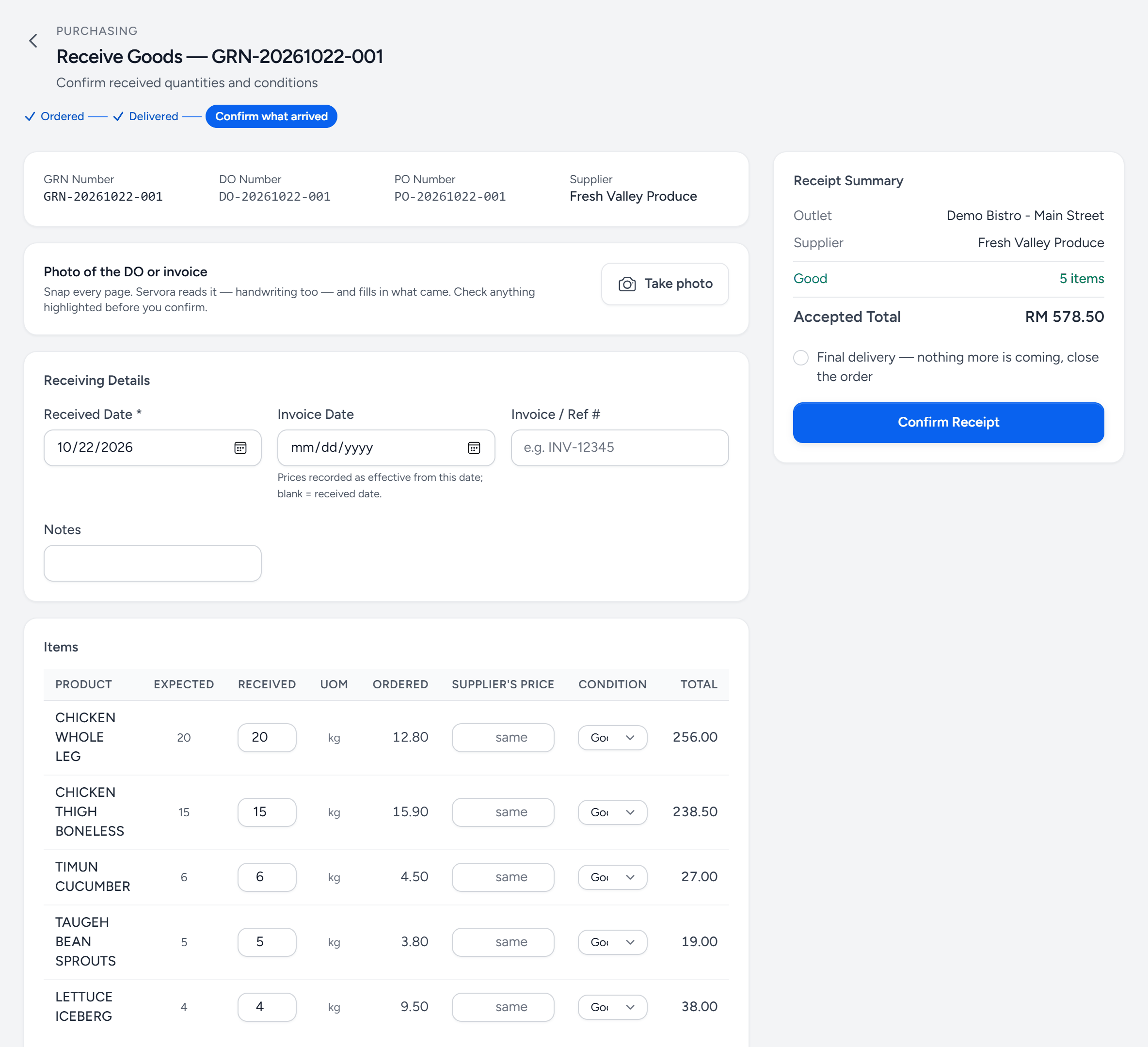
- Where it is — ordered, delivered, and now: confirm what arrived.
- Take photo — every page of the DO or invoice. Servora fills in the lines from it.
- Received — what actually came, starting from what was expected.
- Supplier's price — only when the paper shows a different price. It goes to Purchasing to decide.
- Condition — good, damaged or rejected. Only good goes into stock.
- Final delivery — tick it when nothing more is coming. Otherwise anything short stays expected.
- Confirm Receipt — stock goes up, and the order shows what is still to come.
Receiving
- Open the delivery and choose Receive.
- Take a photo of the supplier's delivery order or invoice — every page. Servora reads it, handwriting included, and fills in what came. Anything it was unsure of, or that somebody changed by hand on the paper, is highlighted. Check those lines.
- Go line by line: the quantity that actually arrived, and its condition — good, damaged or rejected.
- If the supplier's paper shows a different price from the order, type it under Supplier's price. Leave it as same when it is.
- Confirm Receipt. Servora numbers the GRN.
What this changes, immediately
- Stock on hand at that outlet goes up by what arrived in good condition.
- Anything short, damaged or rejected stays expected, on a new GRN for the same order, until it arrives — unless you tick Final delivery: nothing more is coming, close the order.
- A different price does not change your costs on its own. It goes to Purchasing to decide, and until they do, the delivery is costed at the ordered price.
Price changes
A supplier's price that differs from the order by more than your company's tolerance waits under Procurement → Price Changes, for whoever approves orders or runs central purchasing.
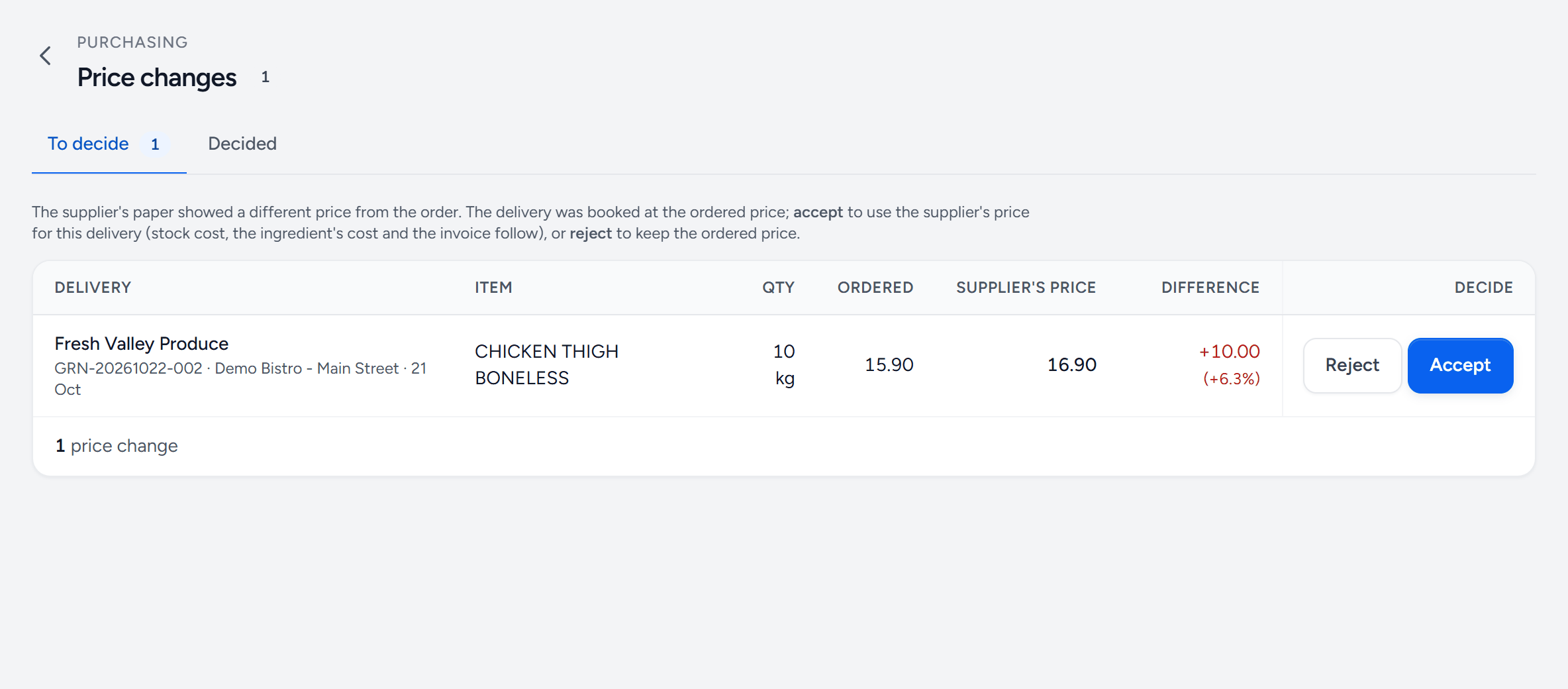
- To decide — what is waiting. Decided keeps the history.
- Ordered — the price on the order.
- Supplier's price — what the supplier's paper said.
- Difference — for the whole delivery, and as a percentage.
- Reject — keep the ordered price. The invoice is checked against it.
- Accept — use the supplier's price: the delivery's cost, the ingredient's cost and the invoice check all follow.
Accepting moves the ingredient's cost, writes it to the price history with the decider's name, and re-costs every recipe that uses it. A big move also raises a price alert.
Partial and short deliveries
Receive what came. The rest stays on a new GRN for the same order and can be received when it arrives. Never change the ordered quantity to match — the gap between ordered and received is a supplier performance measure, and closing it by hand deletes the evidence.
Damaged and rejected
Mark the condition rather than reducing the quantity. Neither goes into stock, and both stay expected from the supplier unless the delivery is final. Both feed the credit note you are about to chase — or, where your company matches invoices, the debit note Servora raises when the supplier bills for them.
Who can receive
In the Staff Portal, anyone listed at the outlet. In the back office, receiving is its own ability, separate from ordering — set it under Settings → Roles & Access.
Still stuck?
Tell us what you were trying to do — a person on our team will reply. If this guide is missing a step or out of date, say so and it gets fixed in the manual, not just in an email.