Reports and analytics
The weekly meeting, on one screen.
The week just closed against the one before, as a report, a full-screen deck for the meeting or a PDF. Behind it, the cost summary, stock movement and purchasing detail that explain every number.
No card required. Every module is in the trial.
How it works
Three steps, start to finish.
-
01
Close the week
Sales and forecast, wastage and transfers by department, overtime and labour cost, against the week before.
-
02
Present it
Run the review as a full-screen slide deck in the meeting, or send it as a PDF.
-
03
Dig into why
Cost summary with COGS, stock and purchasing reports, and menu engineering from real portions sold.
See the real screen
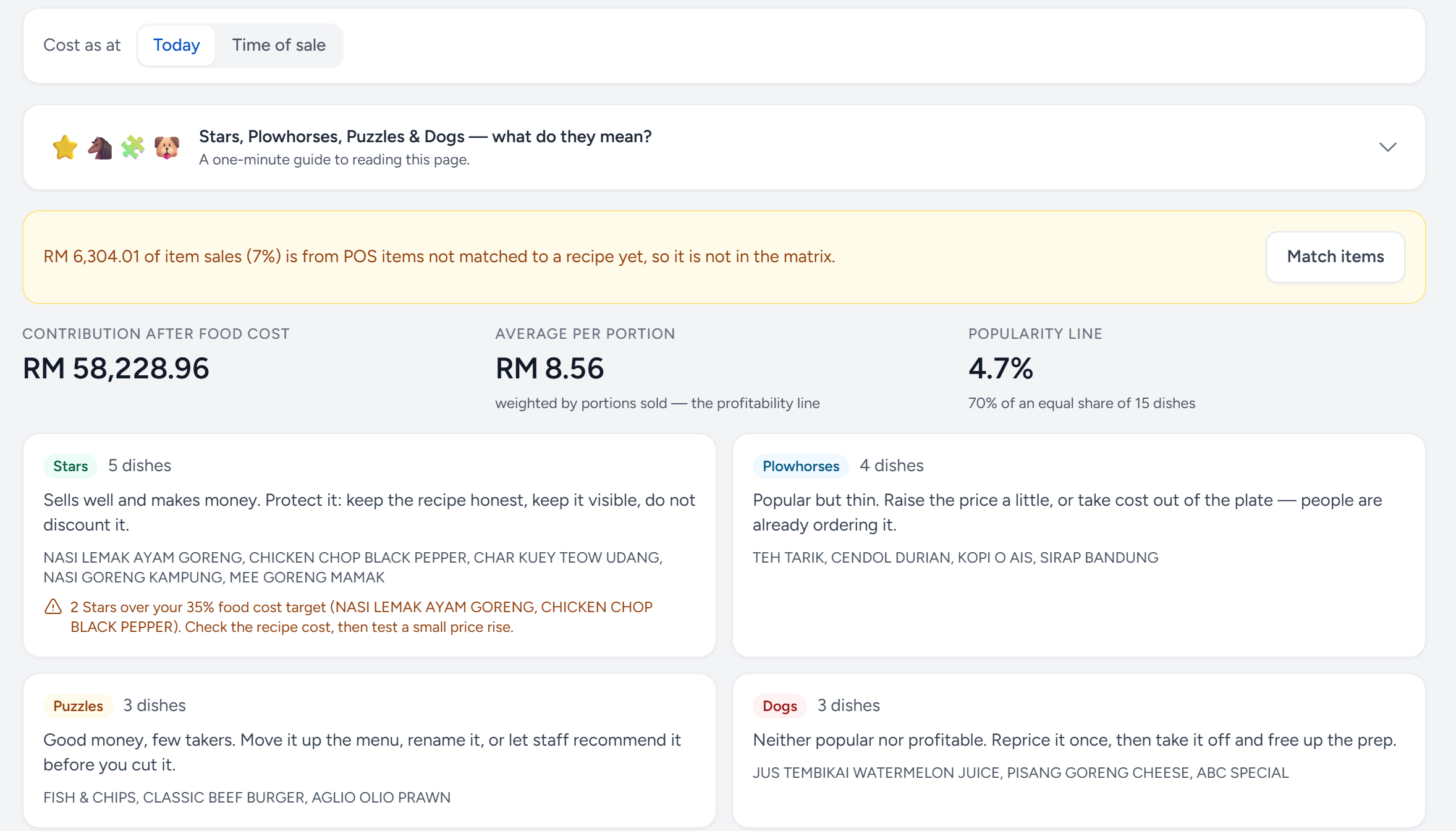
Know which dishes make the money.
Every dish sorted by what it sells and what each portion earns after food cost, from real portions sold.
- Stars — popular and profitable. Protect them.
- Over your target — Stars that sell but cost too much to make, flagged for you.
- Plowhorses — popular but thin: re-cost the plate or nudge the price.
- Dogs — neither popular nor profitable. Reprice once, then free up the prep.
In the box
Everything in Reports.
The weekly management meeting in one screen, and the cost summary, stock movement and purchasing behaviour behind it.
Basic: see what it costs- Weekly WIP review: the week or month just closed against the one before, as a scrolling report, a full-screen slide deck for the meeting, or a PDF
- That review carries sales performance and forecast, wastage and transfers by department, overtime by section, and payroll labour cost
- Cost summary with COGS and month-to-date comparison
- Performance, cost analysis, wastage and labour cost views
- Weekly and monthly periods throughout
- Labour cost with front and back of house split
- Ingredient price history and supplier trend
- Stock balance by product and by package, plus stock cards
- Stock count analysis, adjustments, transfers and inventory variance
- Purchase and order summaries, invoice summary, GRN and DO reports
- Menu ingredient usage read against sales
- Menu engineering from real portions sold and recipe cost, a sales heatmap by weekday and hour, and theoretical against actual usage
- Hero items: the best-earning Star in every category, category group and department, with Stars over your food cost target flagged
- Interactive charts for purchases by supplier, and wastage and stock takes by department
- CSV, Excel and PDF export throughout
- Scheduled report subscriptions by email
Try Reports on your own numbers.
The trial is the full product for 14 days, with no card required. After that, Free keeps one outlet costing for good.