Sales
Record your sales
Enter the day, and every cost figure in Servora has something to be a percentage of.
3 min read · Last reviewed 22 Oct 2026
Servora is not a till. It needs the sales figure so it can turn cost into cost percentage, deduct stock through recipes, and compare labour to revenue. Without sales, half the product has nothing to divide by.
Three ways to get sales in
- Daily totals — one entry per outlet per day (or meal period): the Z-reading's figures and the revenue for each sales category, typed at close.
- From the POS — upload the POS's daily report (Zeoniq Excel on the Sales screen), or let the POS sync agent send it by itself. See POS sync.
- Item level — quantity sold per menu item, imported from the POS's item report under Sales → Item Sales. It is what menu engineering and recipe usage read. See Item sales.
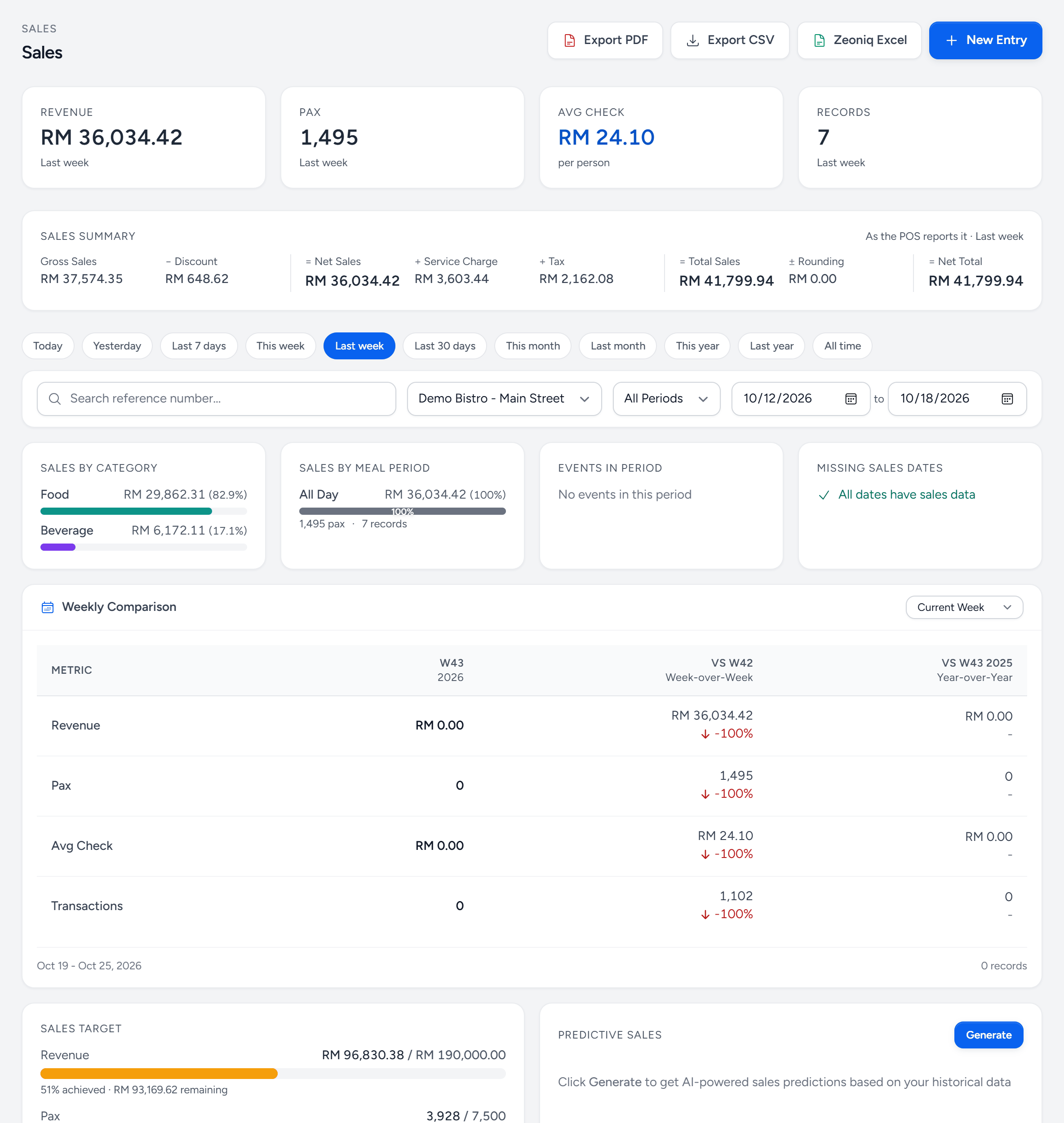
- New Entry — a day's sales, typed from the Z-reading.
- Zeoniq Excel — upload the POS's daily report instead of typing it.
- Revenue — for the period chosen below, with pax, average check and how many records.
- Period — today, last week, this month — or any dates.
- Sales by category — how the revenue splits, food against beverage.
- Missing sales dates — days in the period with no sales entered.
- Weekly Comparison — this week against last week and the same week last year.
- Sales Target — how far into the month's target the outlet is.
Entering a day
- Sales → Sales Records → New Entry.
- Set the Sale Date, the Meal Period (or All Day) and the Pax. The sale date is the trading day, not the calendar date the shift ended — a 2am close belongs to the night before.
- Copy the Z-reading into Z-Report Financials: transactions, gross, discount, tax, service charge and rounding.
- Enter the revenue for each sales category. Servora checks it against the Z-reading's figures and says so if they do not add up.
- Attach the Z-reading or a photo of it. When a figure is questioned three months later, the attachment settles it.
- Save Sales Entry.
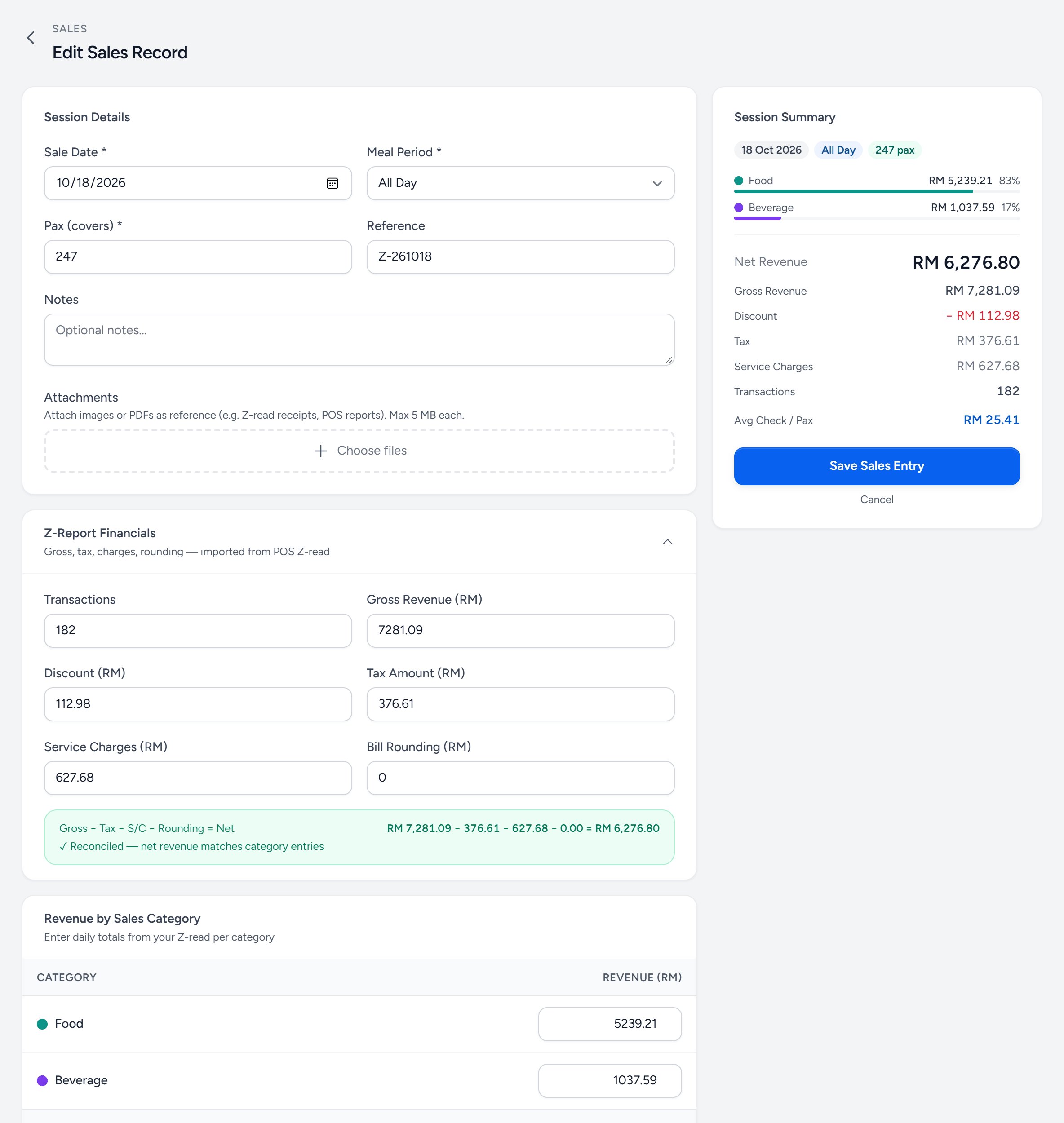
- Sale Date — the trading day.
- Meal Period — All Day, or one entry per period if you split lunch and dinner.
- Pax — covers, for the average check.
- Attachments — the Z-reading, as a photo or PDF.
- Z-Report Financials — gross, discount, tax, service charge and rounding, as the POS printed them.
- Revenue by Sales Category — the day's revenue in each category.
- Session Summary — net revenue, the split, and the average check.
- Save Sales Entry — the day counts in every report from now.
Enter daily, not weekly
A week entered on Monday is a week of stock that did not deduct, dashboards that were wrong, and variance you cannot attribute to a day. It also takes longer in total, because nobody remembers Wednesday. Missing sales dates on the Sales screen lists every day in the period that has none.
Still stuck?
Tell us what you were trying to do — a person on our team will reply. If this guide is missing a step or out of date, say so and it gets fixed in the manual, not just in an email.