Ingredients & recipes
Cost a recipe
Build a dish from ingredients and prep items, see its food cost, and price it against a target.
2 min read · Last reviewed 22 Oct 2026
A recipe is a list of ingredients with quantities. Servora prices each line at today's cost and adds them up — so a recipe costed once stays costed.
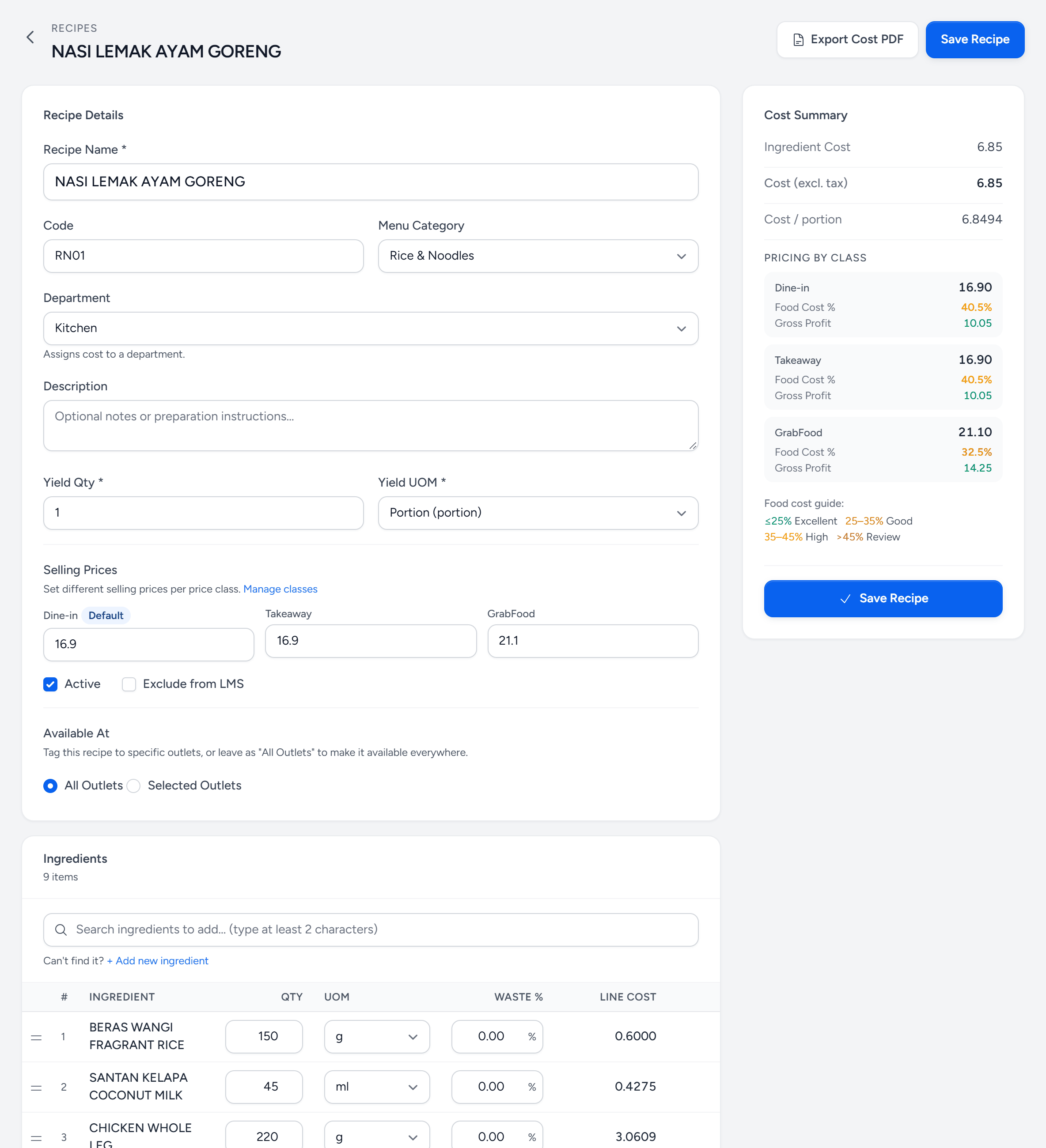
- Yield — how many portions one batch makes. Cost per portion is the total divided by it.
- Selling Prices — one per price class. Dine-in is the default.
- Add an ingredient — ingredients and prep items share one search.
- Waste % — for a line trimmed while cooking, not at prep.
- Line Cost — today's cost of that quantity.
- Cost Summary — ingredients, then extra costs, then the cost of one portion.
- Pricing by class — food cost % and gross profit at each price.
- Food cost guide — green is excellent, red needs a look.
Building one
- Inventory & Recipes → Recipes → New Recipe. Give it a name, a category and a yield — how many portions one batch makes.
- Add a line per component. Ingredients and prep items both appear in the same picker.
- Enter the quantity in whatever unit suits the line — 180 g, 60 ml, 1 each.
- Add a waste percentage on any line that is trimmed during cooking rather than at prep.
Reading the cost
The total is the food cost of one portion at today's ingredient prices. Set a selling price — one per price class, if you use them — and Servora shows:
- Food cost % — cost ÷ selling price. Most restaurant targets sit between 28% and 35%.
- Gross margin — what is left before labour and rent.
- Both against your target, so you can see at a glance which dishes are drifting.
The cost moves on its own
This is the point of the whole exercise. When chicken goes up 18%, you do not re-cost anything: every recipe containing chicken shows a higher cost the moment the new price is accepted, and the dishes that broke their target appear in the cost report.
Extra costs
A recipe can carry costs that are not ingredients — packaging for a delivery item, a portion of gas, a service charge. Add them as extra cost lines so the food cost percentage is honest about what the dish actually costs to put out.
Photos and method
A recipe can hold photographs and step-by-step method, and export as an SOP PDF for the kitchen wall — the same document the kitchen cooks from and the training module can point at. That way the costed recipe and the cooked recipe are the same recipe.
Still stuck?
Tell us what you were trying to do — a person on our team will reply. If this guide is missing a step or out of date, say so and it gets fixed in the manual, not just in an email.