Ingredients & recipes
Prep items
Sambal, stocks, sauces and marinades are recipes that behave like ingredients.
2 min read · Last reviewed 22 Oct 2026
A prep item is something you make in order to make something else. It is a recipe — it has ingredients and a cost — but other recipes consume it the way they consume an ingredient.
Why they matter
Half the cost of a menu is usually hidden in prep. If sambal is entered as a flat "RM 0.60 per portion" guess, then every dish using sambal is guessed, and chilli going up 40% changes nothing on any report. Make it a prep item and one batch re-costs six dishes.
Creating one
- Go to Inventory & Recipes → Prep Items and choose New Prep Item. Add its ingredients like a recipe.
- Set the batch yield — Yield Quantity and Yield UOM: how much one batch produces, in the unit it is counted in (2.5 kg of sambal, 20 L of stock).
- Save. Servora creates a matching entry in your ingredient list automatically.
From then on, "Sambal" appears in the ingredient picker of every other recipe, priced per gram off its own batch cost.
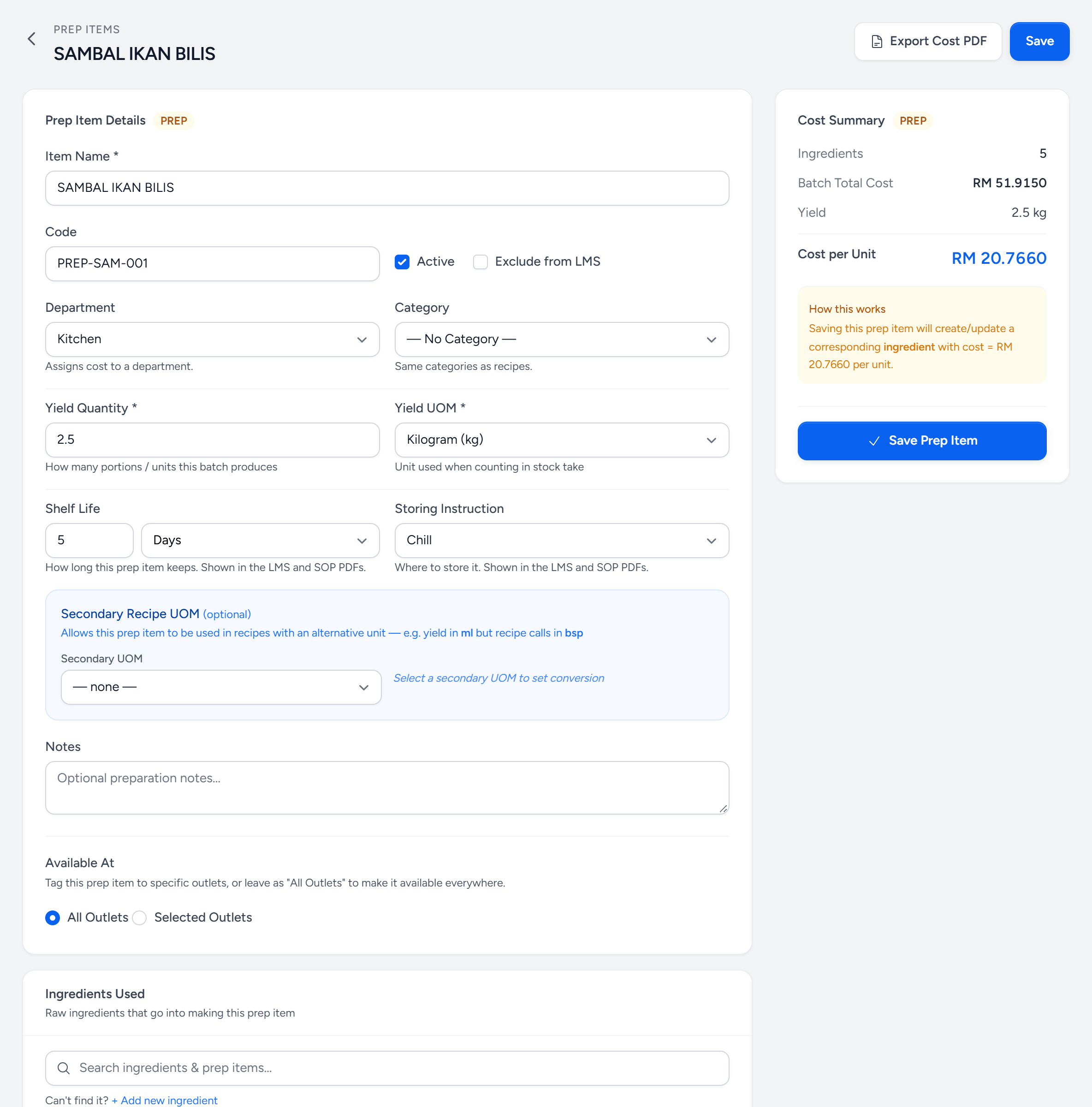
- Yield Quantity — how much one batch makes.
- Yield UOM — the unit it is counted in at a stock take.
- Shelf Life — how long it keeps. Labels use it to print a use-by date.
- Storing Instruction — chilled, frozen or ambient. Printed on the SOP.
- Ingredients Used — what goes in. A prep item can go into another.
- Batch Total Cost — everything in one batch, at today's prices.
- Cost per Unit — the batch cost divided by the yield: what a recipe pays per kg.
- How this works — saving it keeps a matching ingredient up to date, so recipes can use it.
Prep inside prep
A prep item can contain another prep item — a curry base inside a curry, a stock inside a sauce inside a dish. Costs chain all the way down. Changing the price of one onion moves the final dish by a fraction of a sen, correctly.
Prep and stock
Prep items are counted in stock takes like anything else, because a 20 L stockpot in the walk-in is real inventory with real money in it. If a central kitchen makes your prep, see Production orders — the batch is recorded there and transferred to the outlet.
Labels
Prep is also what the label printer is for. Every batch gets a label with what it is, when it was made and when it must be used by — see Print a label.
Still stuck?
Tell us what you were trying to do — a person on our team will reply. If this guide is missing a step or out of date, say so and it gets fixed in the manual, not just in an email.