Ingredients & recipes
The Market List
Every ingredient you buy, what it costs, and the four fields that decide whether your recipe costs are right.
2 min read · Last reviewed 22 Oct 2026
The Market List is every ingredient your business buys. It is the foundation of every cost in Servora, which means the four fields below are worth getting right once rather than fixing later across two hundred recipes.
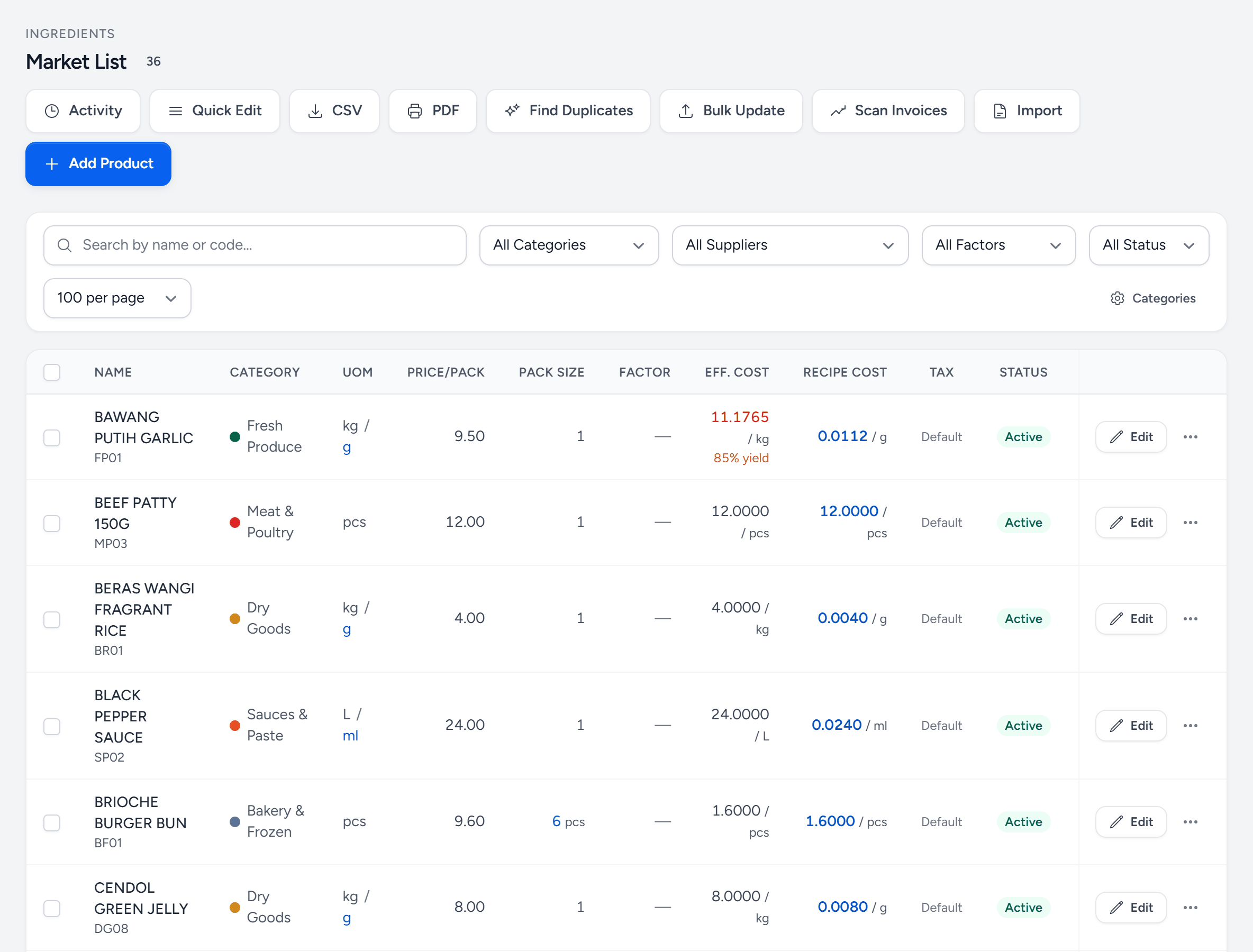
- Add Product — one ingredient at a time. For many, use Import or Scan Invoices.
- Scan Invoices — photograph a supplier invoice or price list; Servora reads it and matches what it can.
- Import — a spreadsheet of ingredients and prices.
- Search and filters — by name or code, category, supplier and status.
- Price/Pack — what the supplier charges for one pack.
- Pack Size — how much of the base unit is in that pack.
- Yield — below 100%, the effective cost goes up — you pay for the trim too. Red means it moved.
- Recipe Cost — the cost per recipe unit, which every recipe uses.
The four fields that matter
| Field | What it is | Example |
|---|---|---|
| Base unit | The unit you buy and count in. | kg |
| Pack size | How much of that unit is in one purchase pack. | 10 (a 10 kg carton) |
| Purchase price | What the supplier charges for one pack. | RM 148.00 |
| Yield % | How much survives trimming, thawing and peeling. | 92% |
From those, Servora computes the number everything else uses:
Cost per base unit = purchase price ÷ pack size ÷ (yield ÷ 100)
RM 148.00 ÷ 10 kg ÷ 0.92 = RM 16.09 per usable kg
Why yield is not optional
You paid RM 14.80 a kilo. You can only cook with RM 16.09 of it, because 8% went in the bin as trim. A recipe costed at RM 14.80 is understated by 8% on every portion, forever, and nothing downstream will ever tell you. Yield is the single field most often left at 100% and most often wrong.
If you do not know a yield, weigh one delivery before and after prep. Do it once per ingredient and never again.
Recipe unit
You buy in kilos and cook in grams. Set the recipe unit and Servora converts, including the odd ones — a case of 12 × 1 L, a tin measured by weight but used by volume. Where the conversion is not standard, add it on the ingredient itself.
Keeping prices current
You should almost never edit a price by hand. It updates itself when a delivery comes in at a new price and Purchasing accepts it (see Receive a delivery), or when you import a supplier price list under Review Documents. Both leave a dated record; a manual edit is a number with no story behind it.
Categories
Every ingredient belongs to a product category (Settings → Product Categories), and categories are how every cost report groups. Keep to around a dozen — Produce, Poultry, Seafood, Meat, Dairy, Dry goods, Beverage, Packaging, Cleaning. Forty categories make a report nobody reads.
Still stuck?
Tell us what you were trying to do — a person on our team will reply. If this guide is missing a step or out of date, say so and it gets fixed in the manual, not just in an email.