Inventory
Assets: the register, counts and breakage
Track plates, pans, knives and equipment like stock: what each outlet holds, what it is worth, and where the breakage went.
4 min read · Last reviewed 19 Oct 2026
Plates break, knives walk and gastronorm pans go to the other outlet and never come back. Assets keeps track of the things you own but do not sell: smallwares, tableware, appliances and furniture. For each outlet it tells you how many it holds and what they are worth.
The pictures on this page are from a demo company. Tap the numbers on a picture to see what each part does.
How on hand is worked out
The rule is the same as for stock, and it is the only rule:
On hand = the last completed count that listed the item + what was received since − what was disposed of since.
Value is on hand × the unit cost on the Asset List. Assets are counted per item type ("Dinner plate 27cm"), not per serial number, and they are valued at cost without depreciation.
1. Set up the Asset List
Assets → Asset List is the catalogue: every kind of item, once for the whole company, with a photo, a category, the unit it is counted in (piece, set, pair), a unit cost and who sells it. Use + Category to group them the way the kitchen thinks (Smallwares, Kitchen Equipment, Tableware, Furniture), and + Add Asset for each item.
The photo matters more than it looks: it is printed on the count sheet, so the person counting knows which "small bowl" you mean.
2. Count what each outlet holds
Start with a count, because a count is what sets the baseline. New count, choose the outlet and the date, then add items: Load a whole category, load a template, or add them one by one.
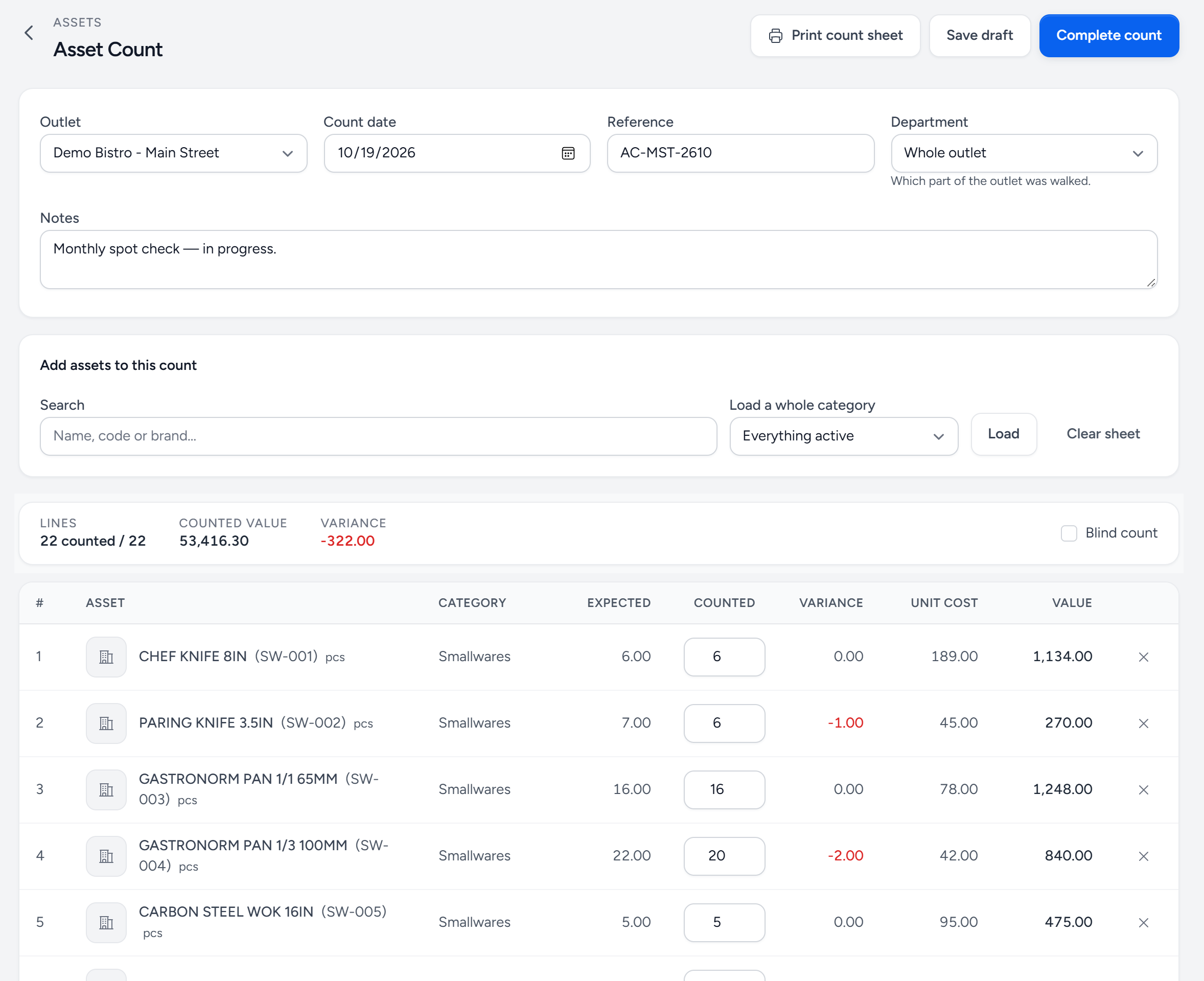
- Print count sheet — a sheet with a photo on every row and no expected quantities, for the person walking the outlet.
- Complete count — makes this the new baseline for every item on the sheet.
- Load a whole category — add every item in a category, or everything active, in one go.
- Blind count — hides the Expected column on screen as well.
- Expected — what Servora thinks is there: the last count, plus receipts, minus disposals since.
- Counted — what is actually there.
- Variance — counted minus expected. Red means missing; multiplied by the unit cost, it is the loss.
- Print count sheet after saving gives the team a sheet with a photo on every row and no expected quantities, so they count what is there rather than copying a number.
- Blind count hides the Expected column on screen too.
- Complete count makes it the new baseline. An item that was not on the sheet keeps its previous count, so you can count one category at a time.
- A completed count can be reopened by someone with permission, if a row was keyed wrong.
3. Record what comes in and goes out
- Receipts — new items arriving. When assets are bought through Servora (they can sit on purchase requests, orders, delivery orders and GRNs next to ingredients), receiving the GRN books the receipt for you.
- Disposals — broken, lost, written off, sold or returned. Pick the reason; the register stops counting them.
- Transfers between outlets move them in the register automatically: a disposal at the sender, a receipt at the receiver.
- Credit notes for returned or damaged assets take them off the register when the note is issued (never while it is a draft).
4. Read the Asset Register
Assets → Asset Register is the answer to "what does this outlet hold, and what is it worth?" — the last completed count, plus every receipt and disposal since.
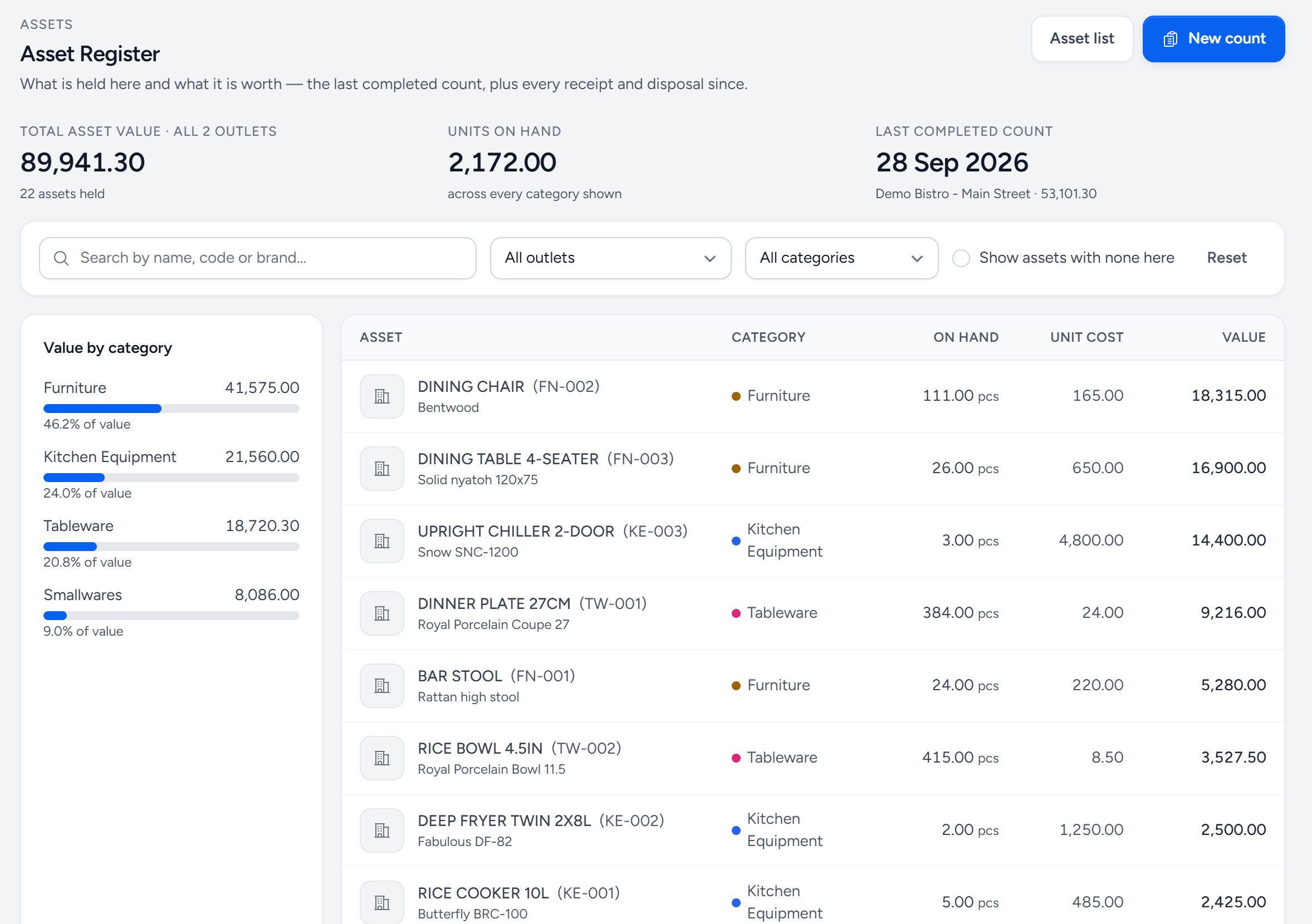
- New count — start a count from here.
- Total asset value — on hand × unit cost, for the outlets shown.
- Last completed count — the baseline everything since is added to or taken from.
- Show assets with none here — include Asset List items this outlet does not hold.
- Value by category — where the money sits: usually furniture and equipment, while the breakage is in tableware.
- On hand — the last count, plus receipts, minus disposals since.
Asset Records lists every count, receipt and disposal with its value, so you can see where the breakage went month by month.
A routine that works
- Once: set up the Asset List with photos, then do a full count at every outlet.
- As it happens: record breakage as a disposal the same day. Monthly breakage is a cost; nobody can manage a cost nobody wrote down.
- Every quarter: count again, a category at a time if that is easier. The variance between expected and counted is your loss.
Common questions
The register says we have items we do not.
Something left without being recorded. Count it: the completed count resets the baseline, and the variance on the count tells you how many went missing since the last one.
Why is an item missing from the register?
The register lists what an outlet holds. Tick Show assets with none here to see the whole Asset List.
Can I see assets on a purchase order?
Yes. Add them to a purchase request or order like an ingredient. Receiving the delivery books them into the register at that outlet.
Still stuck?
Tell us what you were trying to do — a person on our team will reply. If this guide is missing a step or out of date, say so and it gets fixed in the manual, not just in an email.