People & payroll
Attendance
What actually happened, entered by a manager — and why it is not derived from the roster.
2 min read · Last reviewed 22 Oct 2026
Attendance is the record of who actually worked. It is entered by a manager, deliberately: deriving it from the roster would record the week you planned, and the whole reason you need it is the days it differs.
The codes
| Code | Means |
|---|---|
| ✓ | Present — worked the shift. |
| X | Off — a scheduled rest day. |
| ABS | Absent — should have worked and did not. |
| MC / SL | Medical or sick leave. |
| AL | Annual leave. |
| RPH | Public holiday. |
The codes are configurable — add your own with Manage Codes on the Attendance Record. Each carries whether it is paid, and whether it counts as a working day.
Marking a month
HR → Attendance Record shows a grid of staff against days. Pick a code under Mark as, then click the cells it applies to. Most days are one code across the whole team, so start with Fill Empty with ✓ and then fix the exceptions.
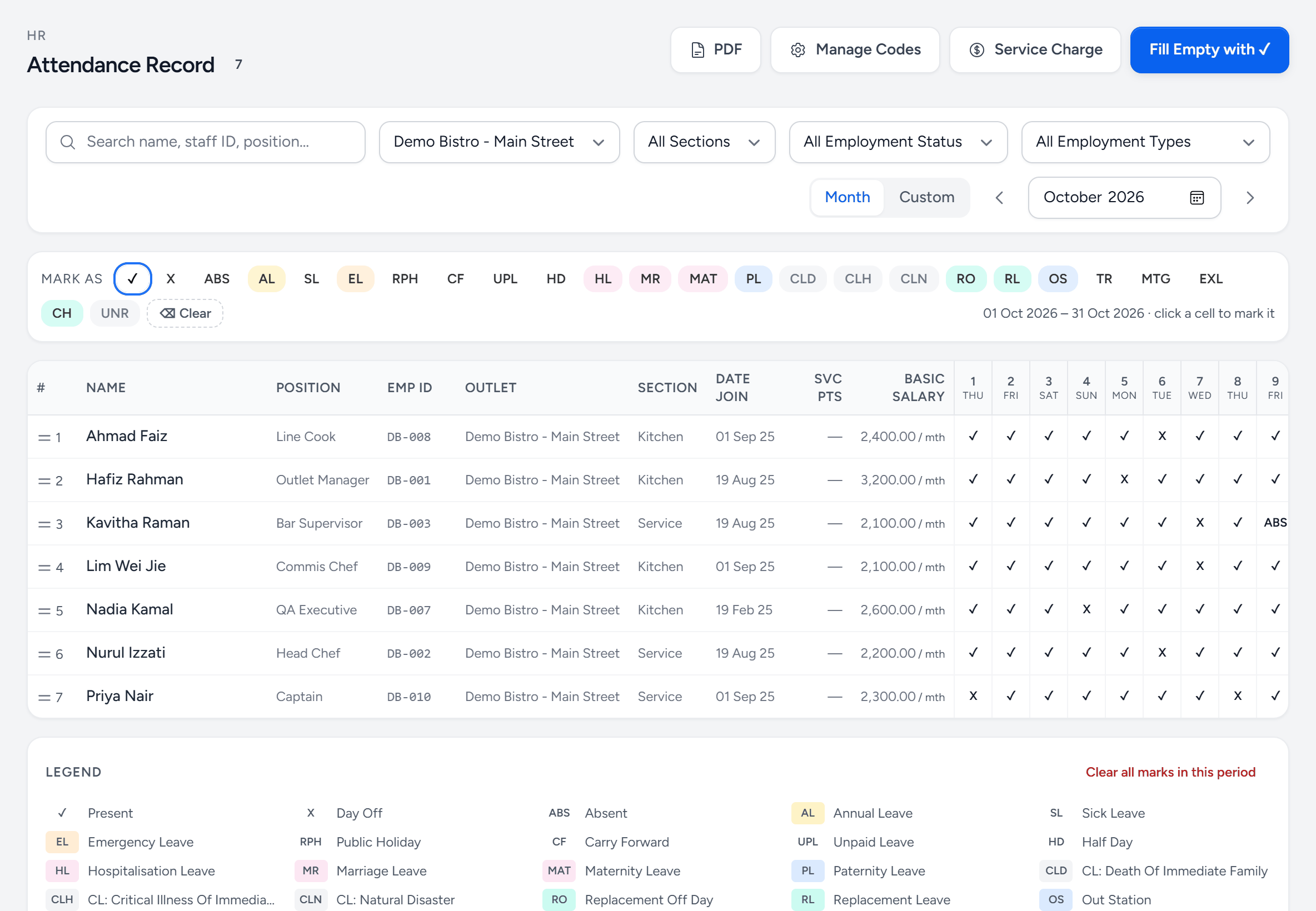
- Mark as — pick a code, then click the days it applies to.
- Manage Codes — add your own, and say whether each is paid and counts as a working day.
- Fill Empty with ✓ — marks every empty day Present, for salaried staff. Then fix the exceptions.
- Month or Custom — a calendar month, or a pay cycle that crosses one.
- An absence — ABS — should have worked and did not. Unpaid, unlike MC.
- Basic salary — shown beside each person so the cost of a mark is never far away.
- Legend — every code and what it means.
Why the distinction matters at payroll
Absent and medical leave are both days not worked and they are treated completely differently: one is unpaid, the other is paid and counts toward entitlement. Service-charge distribution also reads these codes — a month labelled MC is treated differently from a month labelled ABS. Marking everything ✓ because it is faster produces a payroll run that is wrong in both directions.
Clock-in
Where you use the clock-in app, actual clock times sit alongside the attendance record — see Clock-in. They inform the attendance mark; they do not replace it, because a manager still has to say whether a late clock-in was a late start or a shift swap.
Still stuck?
Tell us what you were trying to do — a person on our team will reply. If this guide is missing a step or out of date, say so and it gets fixed in the manual, not just in an email.