People & payroll
Clock-in
Four ways to clock in — the outlet kiosk, a phone with a face check, the kiosk's QR, or the outlet's QR poster — and what a manager sees afterwards.
12 min read · Last reviewed 27 Oct 2026
Staff clock in, clock out and take breaks either on a tablet at the outlet or on their own phone in the Staff Portal. Every punch is recorded against the person and their outlet, checked against their roster, and anything unusual is set aside for a manager.
Five ways in
- Outlet kiosk — a tablet on the counter recognises whoever walks up. No PIN and no GPS: the paired tablet is what vouches for the outlet. If it cannot recognise somebody it can offer their PIN instead, and that punch goes to a manager.
- Own phone, with a face check — Staff Portal → Clock. The phone's location is checked against the outlet's geofence, and the person turns their head once for the camera.
- Own phone, scanning the kiosk's QR — the kiosk shows a QR code that changes every few seconds. A photo of it is soon out of date, so it stands in for the location check — but the phone's location is still recorded, and a punch made far from the kiosk is flagged Phone was far from the kiosk it scanned, in case a colleague forwarded the code to somebody who was not there. The face step stays.
- Quick clock-in, with the outlet's QR poster — for phones the face check is too slow on. Staff scan a QR poster printed for their outlet, and the phone's location must also be inside the outlet's geofence. Both have to pass. The location is reported by the phone, so somebody using a mock-location app could still pass from elsewhere — as with any phone punch — and there is no face scan or selfie, so nothing shows who held the phone. Choose it where speed matters more than proof. Where GPS is unreliable — a basement, a mall — Accept the poster without a location lets the poster alone clock somebody in: a location the phone does share is still checked, and a punch far from the outlet, or with no location at all, goes to a manager instead of being refused.
- Own phone, by location alone — no face scan and no QR: the phone's location is the whole check. It has to be inside the outlet's geofence — or inside another outlet that also clocks in by location, where it counts as a visit. Turn it on for one outlet, or for every outlet at once with Clock in by location only, everywhere. Nothing shows who held the phone, so this too is for where speed matters more than proof.
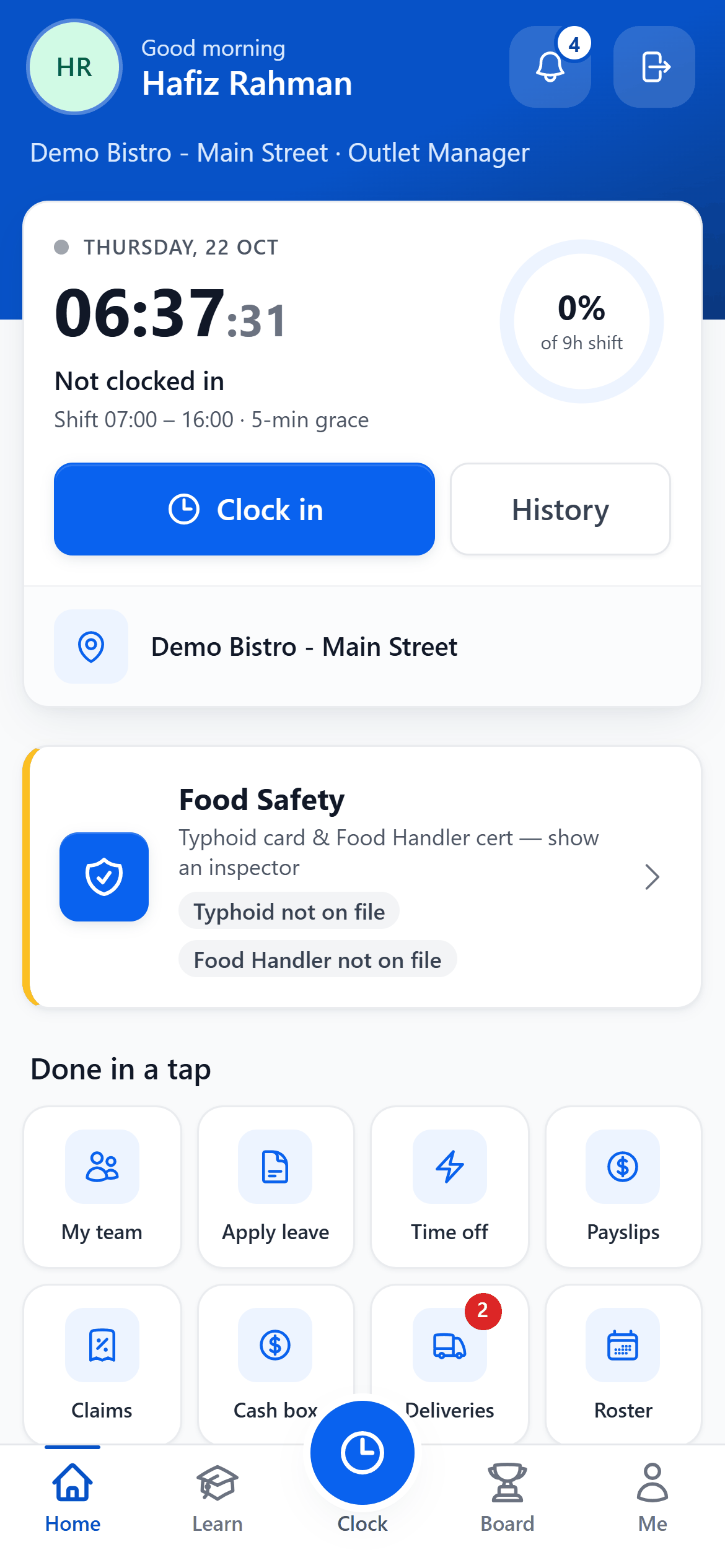
- Not clocked in — where you stand today.
- Your shift — from the approved roster, and how late you can be before it counts.
- Clock in — checks where the phone is and, if your company uses it, your face.
- History — every punch you made, and any sent for review.
- Where — the outlet you are clocking in at.
- Done in a tap — leave, time off, payslips, claims and the rest.
Setting it up
- HR → Clock-Ins → Settings, under Where each outlet is: set each outlet's location — Pick on map, or Use my current location while standing there — and its radius. Then choose where its staff clock in: Kiosk only, Own devices only, or Kiosk and own devices.
- For a kiosk: Manage kiosks on the same screen, and pair the tablet with its code. Enrol faces under HR → Clock-Ins → Face Enrolment, or on the kiosk itself.
- For quick clock-in: under How staff clock in, choose Selected staff (then tick Quick clock-in on each of those employees) or Everyone, and save. Each outlet then shows Print poster — print it on A4 and put it up where staff arrive. If a photo of a poster gets passed round, press Replace code and print the new one: every copy of the old poster stops working at once. An outlet with no location set keeps the face check. Tick Accept the poster without a location underneath if phones there struggle to get a GPS fix.
- For location only: under Checks, tick Clock in by location only, everywhere — every outlet with its location set — or Clock in by location only under one outlet in Where each outlet is. A phone away from every outlet then clocks in on its location too, with a short reason, and is flagged Outside the outlet for you.
- Staff whose work is not at the outlet — area managers, drivers, offsite crews — can be set to Clock in from anywhere on their employee record, so they are neither refused nor flagged for being away. While location-only clock-in is on for them — the company-wide switch, or their own outlet's tick — they clock in on location alone wherever they are: no camera, no QR, no reason and no flag, with their location recorded on every punch.
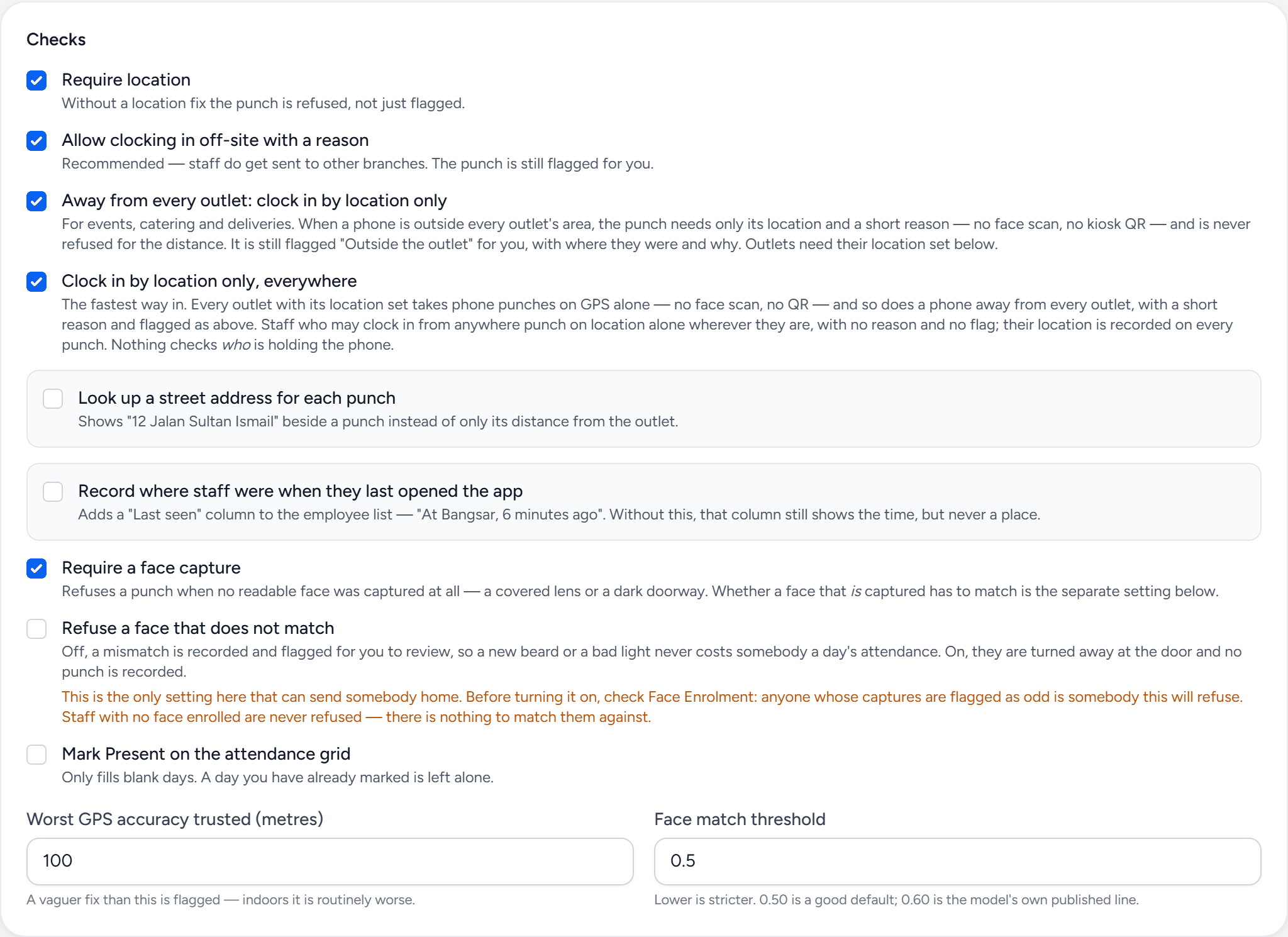
- Require location — a phone punch with no location is refused, not just flagged.
- Off-site with a reason — away from the outlet, a typed reason instead of a refusal. Still flagged for you.
- Away from every outlet — events and deliveries clock in on location and a reason, with no face or QR.
- Location only, everywhere — every outlet with a location set clocks in on GPS alone, and clock-anywhere staff do wherever they are.
- Require a face capture — the face check, for every punch that still uses one.
A phone's own camera app works too: scanning the poster or the kiosk's code opens the Staff Portal ready to clock in, after signing in if needed.
Covering a shift at another outlet
Staff covering at another outlet scan that outlet's QR poster, or the QR on its kiosk. A poster scan checks their location against that outlet's geofence — where they are actually standing — and a kiosk's code proves they are at its counter (the face step still follows a kiosk code). On location-only clock-in, a phone inside another outlet that also clocks in by location is treated the same way; a branch that still wants a face check keeps it. Either way the punch still counts as their shift at their own outlet, so their attendance and service charge stay where payroll expects them. It shows on HR → Clock-Ins as "At outlet (visiting)". When today's roster puts their shift at that outlet it is marked Clocked in at another outlet and accepted without review by default. When it does not — no shift there, or no shift at all — it is marked Clocked in at an outlet they are not rostered at and goes to a manager, so scanning a branch on the way to work can't make anybody on time for a shift somewhere else. Both can be changed under What needs a manager. To use a poster, the outlet being visited needs its location set.
On quick clock-in, Clock In scans — the poster, or a kiosk's code — and Use face check instead underneath is the fallback for when somebody is not at an outlet or the scan will not work. That includes staff set to Clock in from anywhere: at an outlet they scan its poster, and their location must be inside that outlet's geofence like anybody else's; anywhere else they use the face check — unless location-only clock-in is on for them, when the screen opens on Clock in by location instead and needs neither. Staff whose own outlet has no location set keep the face check first, with Scan an outlet QR instead for when they are covering one that has.
Settings worth reviewing
- Lateness — the grace period, the amount charged per late minute and the cap per shift (taken from service charge), and how early before a shift a clock-in is accepted. Allow early clock-in up to N hours lets staff with a rostered shift clock in earlier than that, up to N hours ahead: the punch waits for their leave approver, who accepts it as clocked, accepts it from a later time such as the shift start, or rejects it — in HR → Clock-Ins or the Staff Portal's Approvals. The time they actually clocked in is kept on the record.
- Checks — whether a location and a face are required, whether somebody away from the outlet may clock in with a reason, and whether a clock-in marks them Present on the attendance grid. Only blank days are filled; a day a manager has already marked is left alone.
- What needs a manager — which reasons (late, no shift on the roster, outside the geofence, face not matched, and so on) send a punch for review, and which are simply accepted.
- Email a lateness summary (under Lateness) — daily, weekly and/or monthly, to each member of staff's reporting superior and their OT approvers. Each person gets only their own staff at 8am: who was late and by how much, who ran over a break, what was deducted or waived, and a late comers leaderboard ranking their staff by total minutes late over the last 30 days (or the month, for the monthly one).
What managers see
HR → Clock-Ins lists every punch with where it was made and how it was checked. Punches sent for review wait there for Approve or Reject; the employee sees your note if you reject one.
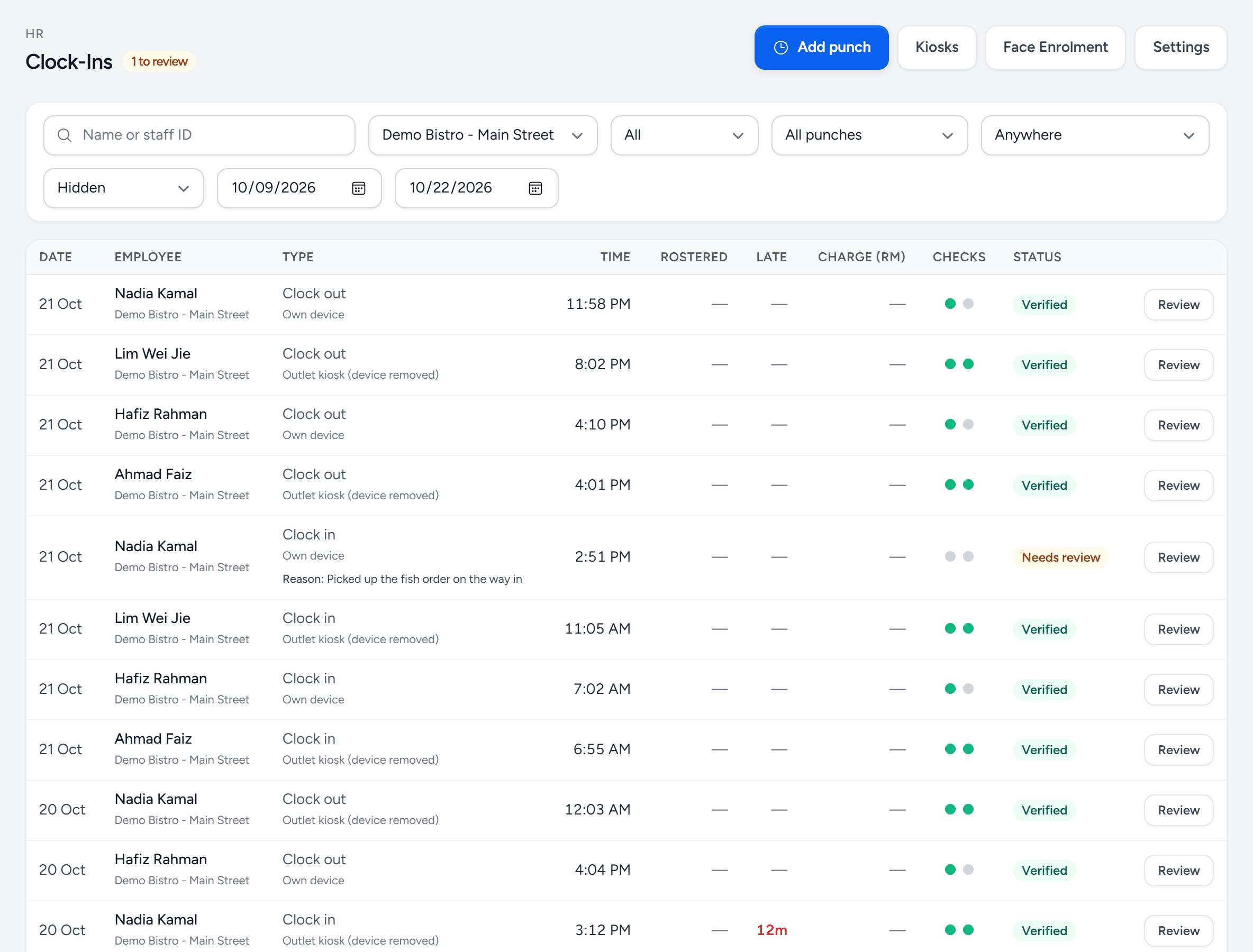
- Add punch — one that is missing — a dead phone, a forgotten clock-out.
- Kiosks — pair and manage the outlet tablets.
- Face Enrolment — enrol faces for the kiosk and phone checks.
- Settings — geofences, lateness, early clock-in and the one-phone lock.
- Needs review — outside the geofence or failed a check. Review to approve or reject.
- The reason — what the employee said when it was sent for review.
- Late — minutes after the rostered start, past the grace.
- Checks — location and face, green when they passed.
When somebody forgets to clock out
- A reminder first. An hour after their rostered shift ends — or 12 hours after clocking in, with no shift on the roster — anybody still clocked in gets one notification on their phone to clock out.
- The next day is an ordinary clock-in. Six hours after the shift ends (16 hours with no shift), the open clock-in stops counting. The phone and the kiosk offer Clock in, with a note that they did not clock out, rather than closing yesterday as a 23-hour shift. Overnight shifts and overtime inside those six hours clock out as normal.
- The gap comes to you. The forgotten clock-in is flagged Did not clock out — add the time they left, and everybody who may add punches for that person is notified. No clock-out time is guessed: press Add punch (see Correcting and adding punches) with the time they left — the flag comes off — then approve the clock-in.
- A clock-out pressed long after the shift anyway — on the kiosk the next morning, say — is still recorded against that shift, and flagged Clocked out long after the shift ended so you can correct the time.
Overtime is not created from the roster unless you ask
Planned OT on the Duty Roster is a plan, so approving a roster does not raise OT claims by default — add overtime under HR → Overtime Claims. To raise claims from the planned OT instead, tick Create OT claims beside Approve for that roster, or turn on Create OT claims automatically when a roster is approved under Duty Roster → Settings for the outlet. Claims raised this way still wait for approval.
Manager pages in the Staff Portal
Managers get a Team tab in the Staff Portal. It appears for staff whose record is tied to a back-office account — the login a Company Admin created for them — and shows the outlets that account reaches:
- Today — everybody at those outlets with their shift from the approved roster, whether they are clocked in, on a break or clocked out, and whether they were on time, late by how much, not in yet, or missed the shift. It refreshes itself every minute.
- Leave — a week or month calendar of who is on leave, approved and pending, with public holidays marked.
- Approvals — for leave approvers only: pending leave and time off from their staff, approved in one tap or rejected with a note. See Leave, time off and overtime claims for who approves whom.
To tie a staff record to an account, pick it under Back-office account on the employee's record (HR → Employees, next to Reports to). Left empty, an account with the same email as the staff record is used.
Giving staff a PIN
Staff sign in to the Staff Portal with a PIN. Under HR → Staff PINs, the easiest way is to let them choose their own: tick the people — Without a PIN ticks everybody who has an email and no PIN yet — and press Email PIN link. Each gets an email with a Set my PIN button. The link works once, for 7 days; sending again replaces it. A person's current PIN keeps working until they use the link, so emailing everybody locks nobody out. Staff with no email on their record are listed as not sent — add one under HR → Employees, or use Issue PIN and hand it to them.
One phone per person
Switch on Lock each person's Staff Portal to one phone under HR → Clock-Ins → Settings to stop a PIN being used on somebody else's phone. The first phone a person uses becomes theirs. The lock can only remember a browser, so a new phone, cleared browser data — and on an iPhone, Safari and the app added to the home screen — all count as another phone.
Staff are not stuck when that happens. After the right PIN on another browser they are offered Use this phone instead, once every 7 days, and their leave approvers are emailed. Staff who sign in with Face ID or a fingerprint (see Sign in with Face ID or fingerprint) move it with no limit, since that proves it is them. You can still reset somebody's phone under HR → Staff PINs, and a reset does not use up their weekly move. Label printing on shared outlet PCs is not affected.
Correcting and adding punches
Somebody's phone died, or they forgot to clock out. Under HR → Clock-Ins, open the punch and use Change the time, or press Add punch for one that is missing — a clock-in, break start, break end or clock-out. Both need a reason, and both are kept: the punch shows edited or manual in the list, and its panel lists every change with who made it, when, the old and new times, and why. The time the clock first recorded is never lost.
- Lateness follows the new time. A clock-in moved earlier stops being late; one moved later becomes late and is charged as any late punch would be. Breaks are worked out again against the allowance. A waived charge stays waived.
- A change stays within 18 hours of the recorded time — for a different shift, add a punch instead. Punches can be added up to 62 days back, never in the future, and not as a second clock-in on a day that already has one or a break with no clock-in before it.
- A changed punch still needs approving as usual; an added one is recorded as approved, entered by you.
- Who can: people whose role has Edit & add punches (Settings → Roles & Access) — Company Admin, Operations Manager and HR Manager to start with — for staff at outlets they can reach. Nobody can change their own punches, even with the permission.
To find late arrivals or long breaks, use the Late filter on the same screen: it lists late clock-ins, breaks over the allowance, or both, with the total minutes for the period.
Clock times are not attendance
They are evidence for it. The attendance record is a manager's statement about the day; the clock is what the tablet or phone saw. Keeping them separate is what lets you record "worked, clocked in late because of the delivery" as a fact rather than a dispute.
Still stuck?
Tell us what you were trying to do — a person on our team will reply. If this guide is missing a step or out of date, say so and it gets fixed in the manual, not just in an email.