People & payroll
Employee records
One record per person, holding what payroll, the roster and compliance each need.
2 min read · Last reviewed 22 Oct 2026
An employee record is the single place a person exists in Servora. Payroll, the roster, attendance and training all read from it.
What a complete record holds
- Identity — name, IC or passport, date of birth, contact details, emergency contact.
- Employment — start date, position, department, section, outlet, employment type.
- Pay — basic salary, pay components (allowances, deductions), bank details.
- Statutory — EPF, SOCSO, EIS and tax numbers, and the categories that decide the rates.
- Documents — contract, IC copy, permits, certificates, with expiry dates.
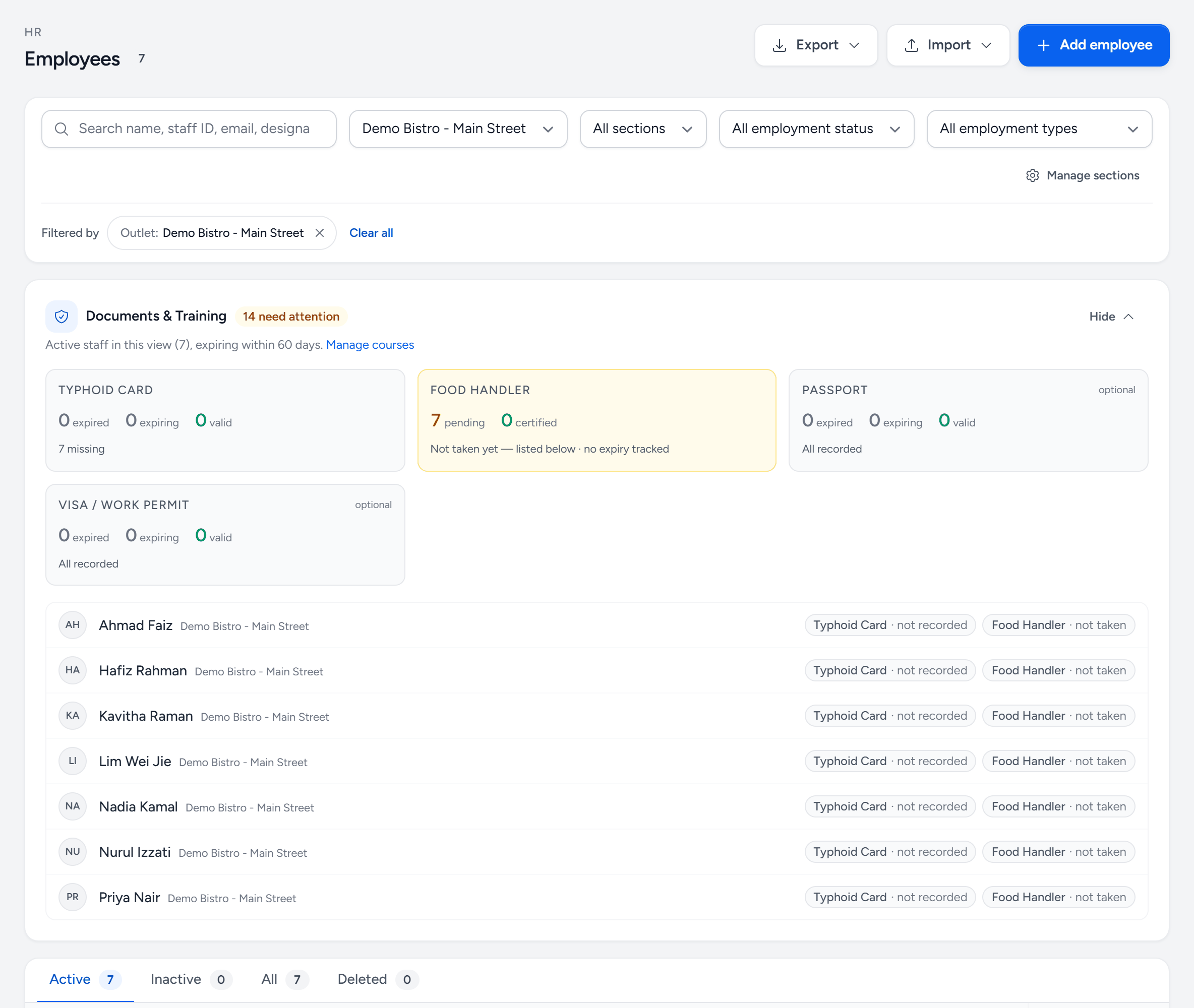
- Add employee — one person. For many at once, use Import.
- Import — a spreadsheet of staff.
- Export — the list as Excel or PDF, including documents and food safety.
- Search and filters — by name, staff ID, outlet, section and employment status.
- Documents & Training — what is missing, expiring or expired, across the people shown.
- Each document — typhoid card, food handler, passport and permit — counted and flagged.
- Active — current staff. Inactive and Deleted keep the history of people who left.
- Edit — the full record: personal, employment, pay, statutory and documents.
Fill the statutory profile before the first payroll
Payroll cannot calculate contributions for a person whose statutory categories are blank, and a run that silently skips somebody is worse than one that refuses. Complete these before the first run rather than during it.
Documents that expire
Work permits, food-handler certificates, medical clearances. Record the expiry and Servora warns you before it lapses. An expired food-handler certificate found by an inspector is a different problem from one found by a reminder.
Leavers
Mark the leaving date rather than deleting the record. Payroll history, EA forms and audit trails all need the person to keep existing. A dated leaver drops off the roster and out of active headcount without taking their history with them.
Still stuck?
Tell us what you were trying to do — a person on our team will reply. If this guide is missing a step or out of date, say so and it gets fixed in the manual, not just in an email.