People & payroll
Leave, time off and overtime claims
Requests, who approves them and where, balances — all of which land in payroll.
4 min read · Last reviewed 22 Oct 2026
Leave types and entitlement
Define your leave types under Settings → Leave Types — annual, medical, unpaid, maternity, compassionate — each with whether it is paid and how many days it gives by default each year.
To set people's own figures, open HR → Leave and press Edit entitlements on the Balances table. Every cell becomes a box for that person's entitled days of that type for the year, and saves as you leave it — so a whole team can be set in one pass. Carry-forward and adjustments are left as they are; change those with Grant, which keeps a note. Replacement days come from the public holiday register, so they are not edited here.
Requesting
Staff apply in the Staff Portal under Leave or Time off; HR can also record a request on their behalf from HR → Leave. The request is emailed to the employee's own superior (set on their record) and to the people who approve it, below. The requester sees the outcome and their remaining balance.
Who approves
Leave and time off are approved by the people named under Settings → Leave Approvers — not by anybody whose role happens to allow it. There are two kinds of entry:
- Outlet and section approvers. An approver for an outlet and a section covers the staff in that section there. Leave the section empty to cover the whole outlet, or the outlet empty to cover the whole company. A section approver never covers somebody with no section.
- Custom approval groups. A named list of staff with their own approvers, for people the outlet and section do not fit — for example "Outlet managers", approved by the operations director rather than by the supervisors who report to them. Once somebody is in a group, only the group's approvers decide their leave and time off; the outlet and section approvers no longer do. A group can have more than one approver, and anyone in it may decide.
A Super Admin can decide anything. A company that has not named any approvers yet keeps the old rule — anybody whose role has the "approve leave" permission — until it names some.
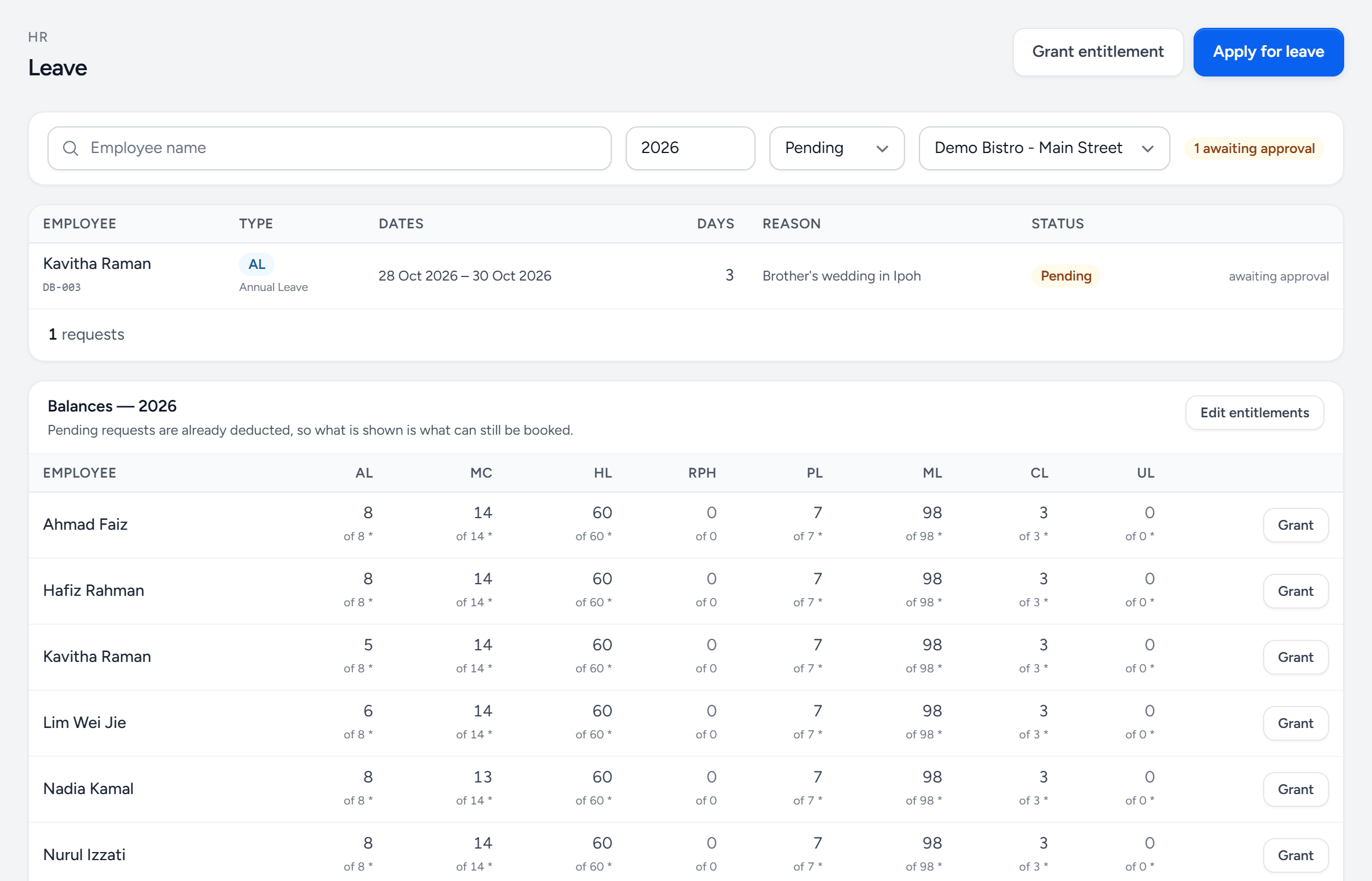
- Apply for leave — record a request on somebody's behalf.
- Grant entitlement — extra days for one person, such as a replacement day.
- Status — pending, approved, rejected or all.
- The request — who, what type, which days, and why.
- Awaiting approval — only the approver for that person sees Approve and Reject.
- Balances — what each person can still take, with pending requests already taken off.
- Edit entitlements — turns every cell into a box for that person's days this year.
- Grant — add days for one person.
Approving
Approvers decide on HR → Leave and HR → Time Off, where the Approve and Reject buttons appear only on the requests that are theirs, or from their phone in the Staff Portal under Team → Approvals (see Clock-in for who gets the Team pages). Both run the same checks: the leave must still fit the balance, and time off must be covered by banked overtime. A rejection carries a note the employee sees.
Approved and pending leave show on the Staff Portal's team leave calendar, so managers can see who is away before they build the roster.
Time off
Time off is the shorter version: an afternoon, a couple of hours, a swap. Same request-and-approve shape and the same approvers, drawn from overtime banked as time off rather than from annual leave.
Overtime claims
The employee submits the hours and the reason and an OT approver signs it. Approved claims feed the payroll run at the rate configured for that employee's category.
OT approvers are their own list, under Settings → OT Approvers, separate from leave approvers and from purchase approvers. The person who signs off spend is rarely the person who signs off hours.
Planned OT on the duty roster does not become a claim by itself. Tick Create OT claims beside Approve when approving a roster, or switch it on per outlet under Duty Roster → Settings; otherwise add overtime under HR → Overtime Claims.
Do it before you close the month
An unapproved claim is not in payroll. Clear the queue before the run is locked — after that, it is a manual adjustment on next month's run and everybody's figures move.
Still stuck?
Tell us what you were trying to do — a person on our team will reply. If this guide is missing a step or out of date, say so and it gets fixed in the manual, not just in an email.