Purchasing
Branches owned by a separate company
When a branch belongs to another company in your group, stock sent to it and goods bought for it are billed to it, at cost.
4 min read · Last reviewed 23 Oct 2026
A group often runs some branches through a separate company — a franchise, a joint venture, a branch with its own Sdn Bhd. Stock or batches sent to such a branch are a sale between two companies, and goods head office pays for are that branch's cost, not head office's. Once Servora knows who owns the branch, it bills them.
Say who owns the branch
- Go to Settings → Branches. Under Companies that own branches, press Add company and give its name, registration number, TIN and address — what goes on the invoices it receives.
- Edit the branch and set Owned by to that company.
Every other branch belongs to your own company, which is the default. Nothing moved between those is billed: it is not a sale.
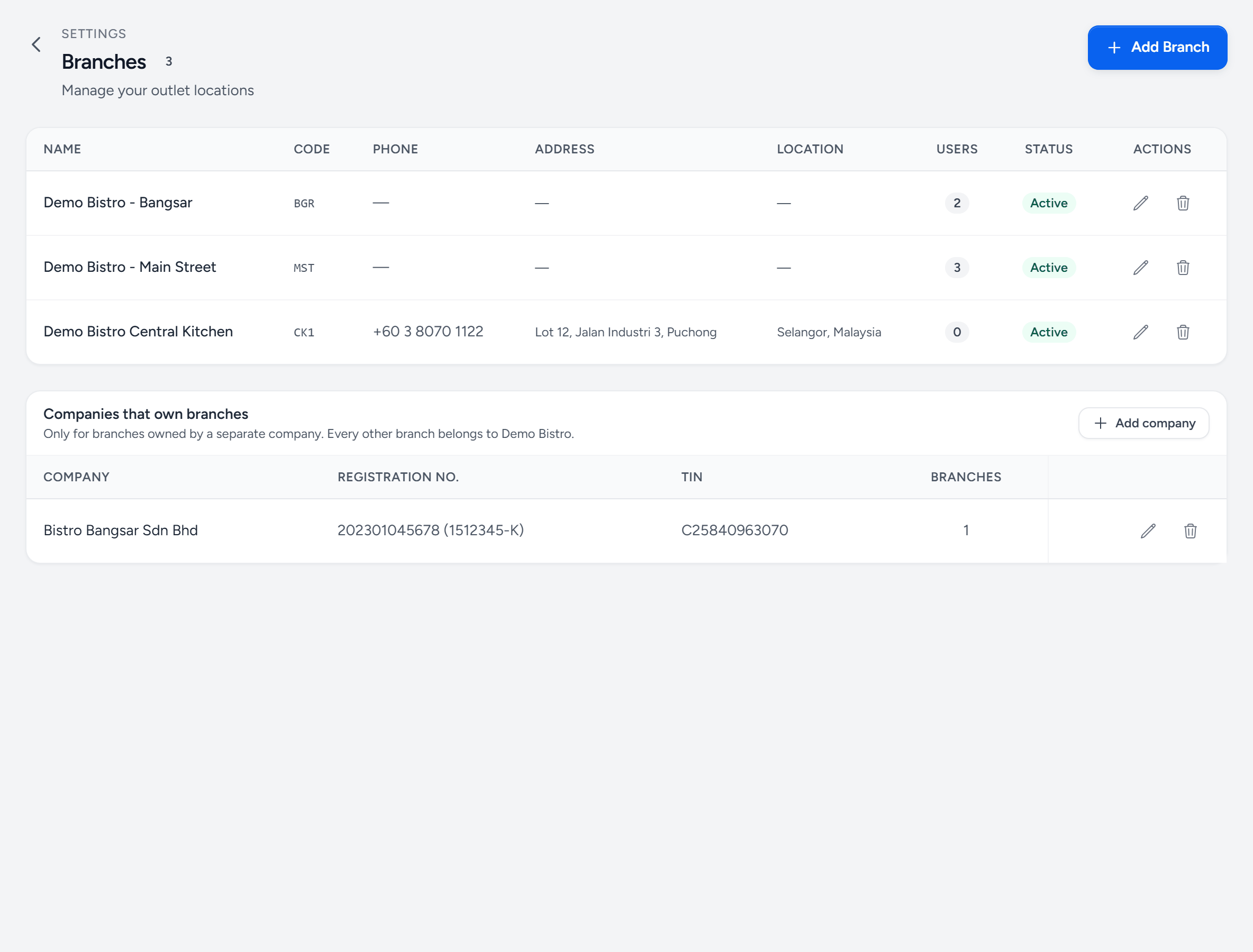
- Companies that own branches — only for branches owned by a separate company. Every other branch is your company's own.
- Add company — its name, registration number, TIN and address, as they go on an invoice.
- TIN — printed on the invoices Servora raises to it.
- Branches — how many branches it owns. Here, Bangsar.
- The branch — its own settings say who owns it.
- Central Kitchen — the store is a branch of your own company, so what it sends to Bangsar is billed.
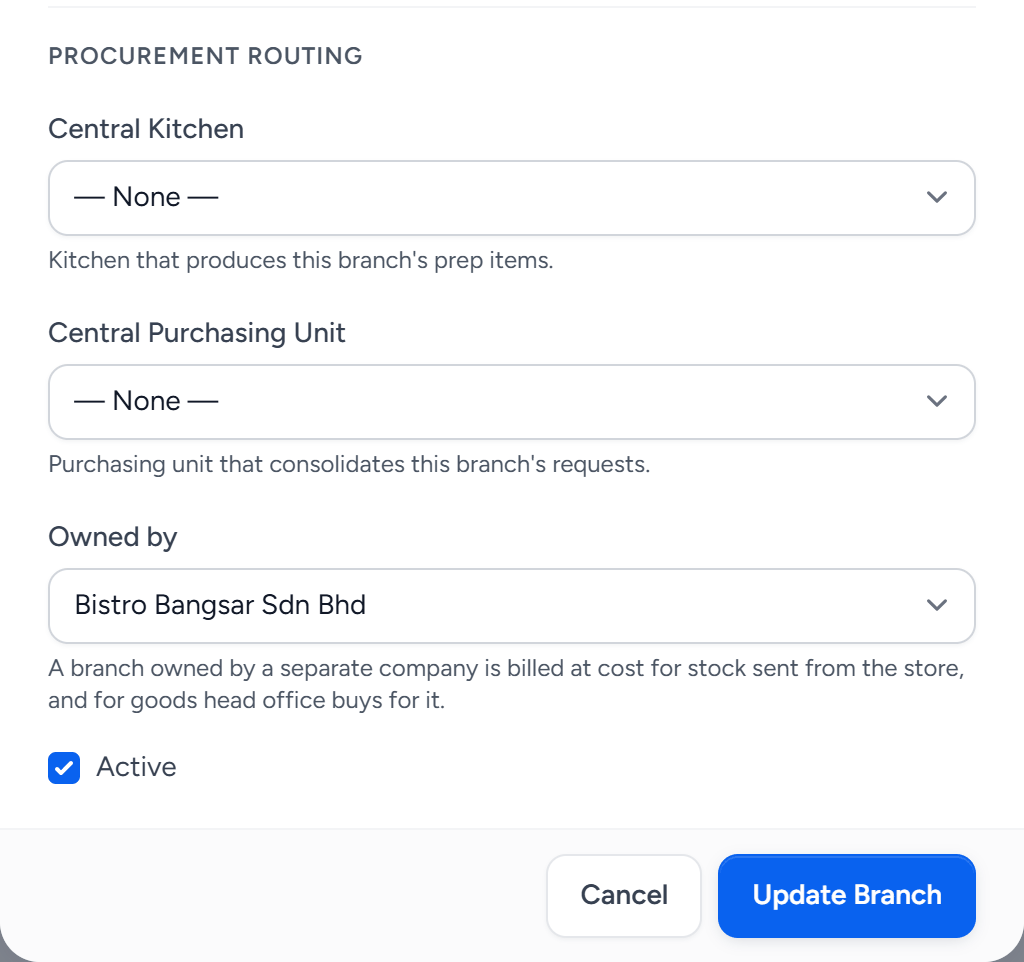
- Owned by — your own company, the default, or one of the companies you added.
- What it changes — stock from the store, and goods head office buys for the branch, are billed to its company at cost.
- Central Kitchen — the kitchen whose store sends to this branch. With only one kitchen, None means that one.
What gets billed
- Stock sent from the store. A store transfer to the branch becomes chargeable when it is sent: each item at its current cost at that moment, with no tax and no delivery charge. The invoice, from the store's company to the branch's, is raised at the same time. Cancelling the transfer cancels the invoice, unless it has been paid.
- Goods head office bought for it. Head office pays the supplier on a central-purchasing order. When one is delivered straight to the branch and received there, Servora raises a recharge invoice to the branch's company for what was received, at the order's price, with no tax.
- Batches the central kitchen made for it. When a production order is completed with the branch as a line's destination, the batch goes out on a transfer and an invoice is raised from the kitchen's company to the branch's, at the batch's cost per unit, with no tax. It names the production order and the transfer — Production PRD-… sent to Bangsar on TRF-… — and the completion message says Invoiced INV-… to its company. Cancelling the transfer under Transfers → Stock Transfers before it arrives cancels the invoice, unless it has been paid.
A branch ordering for itself, not through central purchasing, pays its own supplier and is never recharged.
Stock that never arrived
The branch is invoiced when the transfer is sent, for everything sent. If less arrives, the outlet receives what it counted and the rest follows on a transfer of its own, Rest of STO-…. Say 10 kg were sent and invoiced, 8 kg were counted, and the 2 kg rest never comes, so Purchasing cancels it. The 2 kg come off the bill at the price they were billed at:
- Nothing paid yet — the invoice itself is reduced: the line goes to 8 kg, the total comes down, and a note on the invoice says why.
- Partly paid — the invoice stays as it is, and a credit note for the 2 kg comes off what is still owed.
- Fully paid — the invoice stays as it is, and a credit note is issued as credit due back to the branch's company.
It works however many times a delivery arrives short: each rest is traced back to the transfer that was billed. The credit note's PDF says who it is credited to and which invoice it is against. Between your own company's branches nothing was invoiced, so cancelling a rest changes nothing but the stock.
Where the invoices are
Under Procurement → Orders & Requests → Invoices, with the type filter set to CPU to Outlet. The PDF names who it is from and who it is billed to. They are not supplier invoices, so they never go into a payment run.
Still stuck?
Tell us what you were trying to do — a person on our team will reply. If this guide is missing a step or out of date, say so and it gets fixed in the manual, not just in an email.