Purchasing
Purchase budget: how much you can still order
Each department gets a weekly purchase budget earned from its own sales. Order to "This week · left" and the month closes on its target cost %.
6 min read · Last reviewed 22 Oct 2026
Order to the "This week · left" figure on your department's card. That is how much you can still spend on deliveries from Monday to Sunday. If every department keeps to it, the month closes on its target cost %, and nobody has to wait for the month-end stock take to find out.
The budget is on the Dashboard, at the top, one card per department. If you look after more than one outlet, use the outlet filter to switch between them. The examples on this page are for a demo outlet.
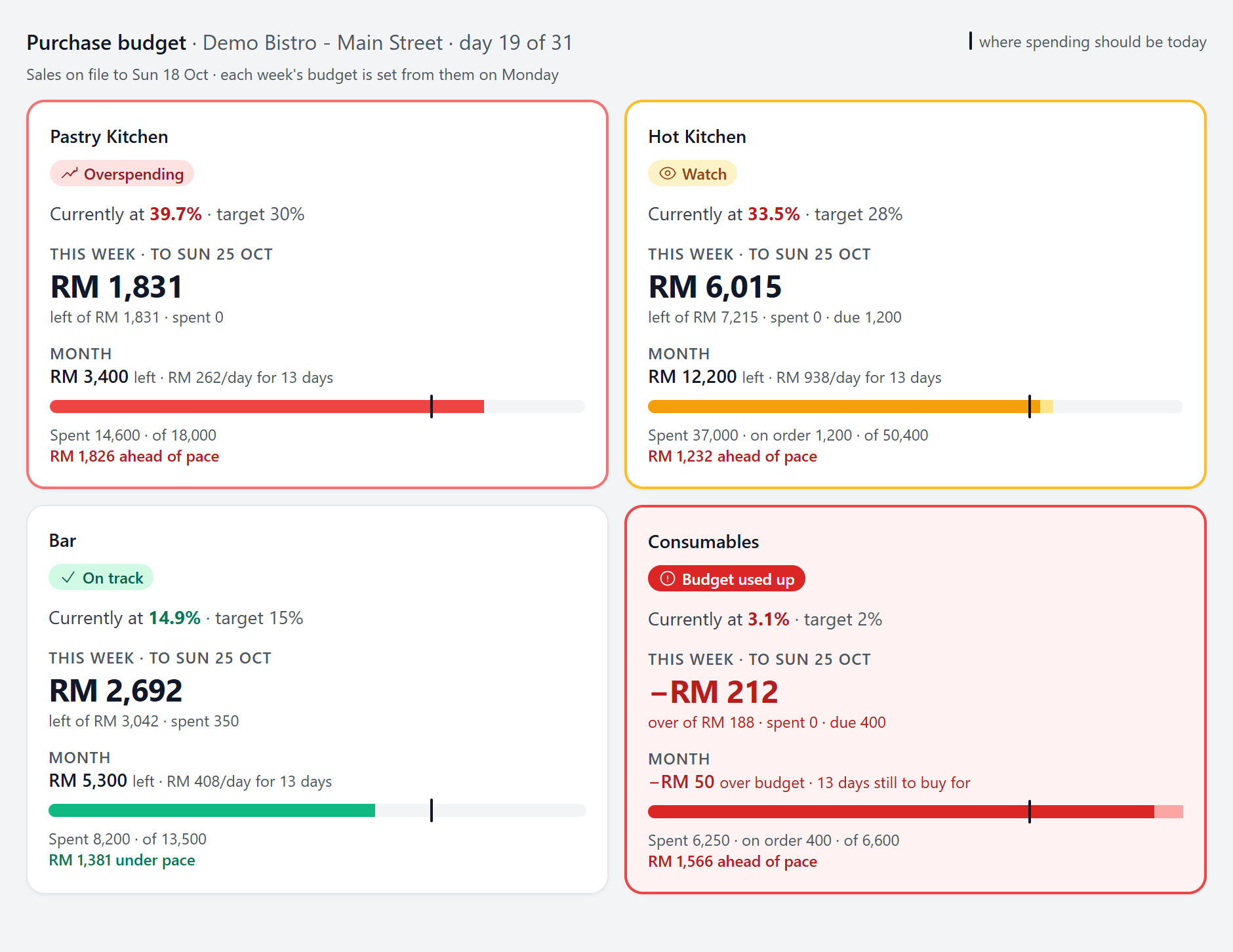
Reading a card
Each number on the card answers one question. Tap a number on the picture, or read the list below it.
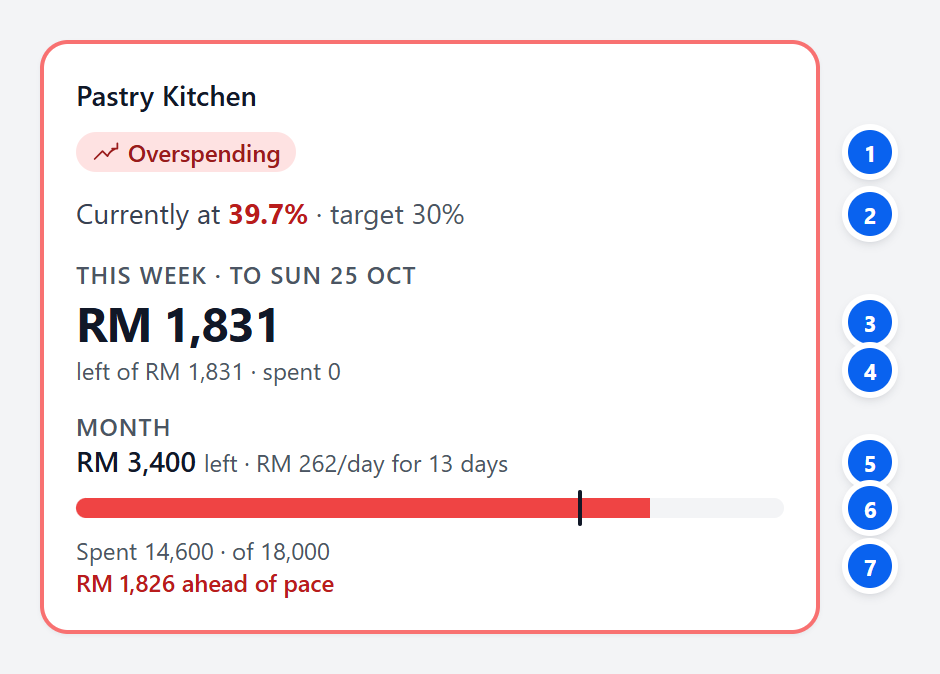
- The badge — how the month is going. See what the badges mean below.
- Currently at · target — purchases so far ÷ sales so far this month. This is the cost % the department is running at today, next to the target it has to land on.
- This week — your number. What is left to spend on deliveries arriving between Monday and Sunday.
- left of · spent · due — the week's full budget, what has been delivered this week, and what is on order to arrive this week.
- Month — what is left for the rest of the month, after everything received and everything still on order. The per-day figure spreads it evenly over the days left, today included.
- The bar — the solid part is spent and the lighter part is on order. The black tick is where spending should be today. It sits 3 days ahead of the calendar, because stock arrives before it is sold, so a normal delivery cycle does not look like overspending.
- Spent · of, and ahead of / under pace — this month's spending out of the month's whole budget, and how far that is past the black tick (red) or short of it (green).
What the badges mean
The badge compares this month's spending with the black tick. The worse it gets, the louder the card: a coloured border for Watch and Overspending, a red card for Budget used up.
| Badge | When it shows | What to do |
|---|---|---|
| On track | Spending is at or below the black tick | Keep ordering to this week's figure |
| Watch | Up to 10% past the tick | Check each order before it goes out. Hold back anything that can wait |
| Overspending | More than 10% past the tick | Order essentials only until next Monday |
| Budget used up | Spent plus on order has reached the whole month's budget | Any order now needs a reason. Talk to your manager first |
| Too early to call | The first 4 days of the month | The budget is sized on last month's sales for now, so there is no verdict yet |
| No sales yet | No sales recorded this month or last | There is nothing to earn a budget from, so spending is not checked |
When any department at your outlets is Overspending or has used up its budget, a red band shows across the top of every page. × hides it until tomorrow, but it comes back the same day if something new or worse happens.

Where the budget comes from
The budget is earned from real sales, never from a forecast or a sales target. A department that sells more gets more to spend.
- The month = the department's target cost % × its sales this month, extended to the whole month at the rate it is selling. Pastry Kitchen is on course for about RM 60,000 of sales, and 30% of that is RM 18,000.
- The week = what is left of the month on Monday ÷ the days left in the month × the days in the week. Pastry: RM 3,400 ÷ 13 × 7 = RM 1,831.
- It is set once a week. Sales come in with the POS import (the line under the heading says how far they go, e.g. "Sales on file to Sun 18 Oct"). After that the week's figure stays fixed, and only your own buying moves what is left.
- It balances itself. Overspend this week and next week starts smaller. Underspend and next week gets a little back. Either way the month still lands on target.
- The delivery date counts, not the order date. A Friday order delivered on Monday is spent from next week's budget.
When an order goes over
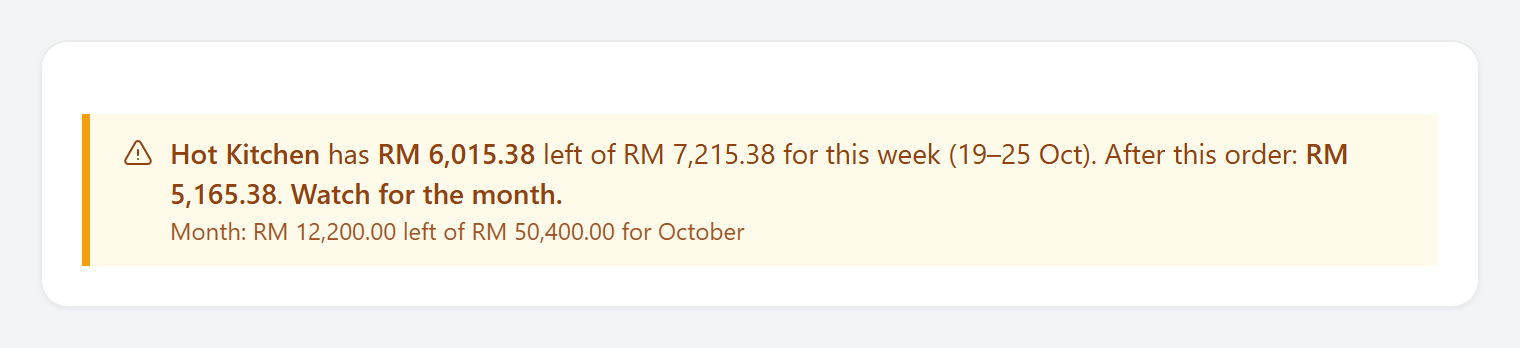
The purchase order, purchase request, purchase capture and petty cash voucher forms all check the department's budget for the week the spend lands in. When it fits, one line says what is left before and after:
When it does not fit, Servora still lets you send it, because the kitchen still has to cook. But you have to say why:
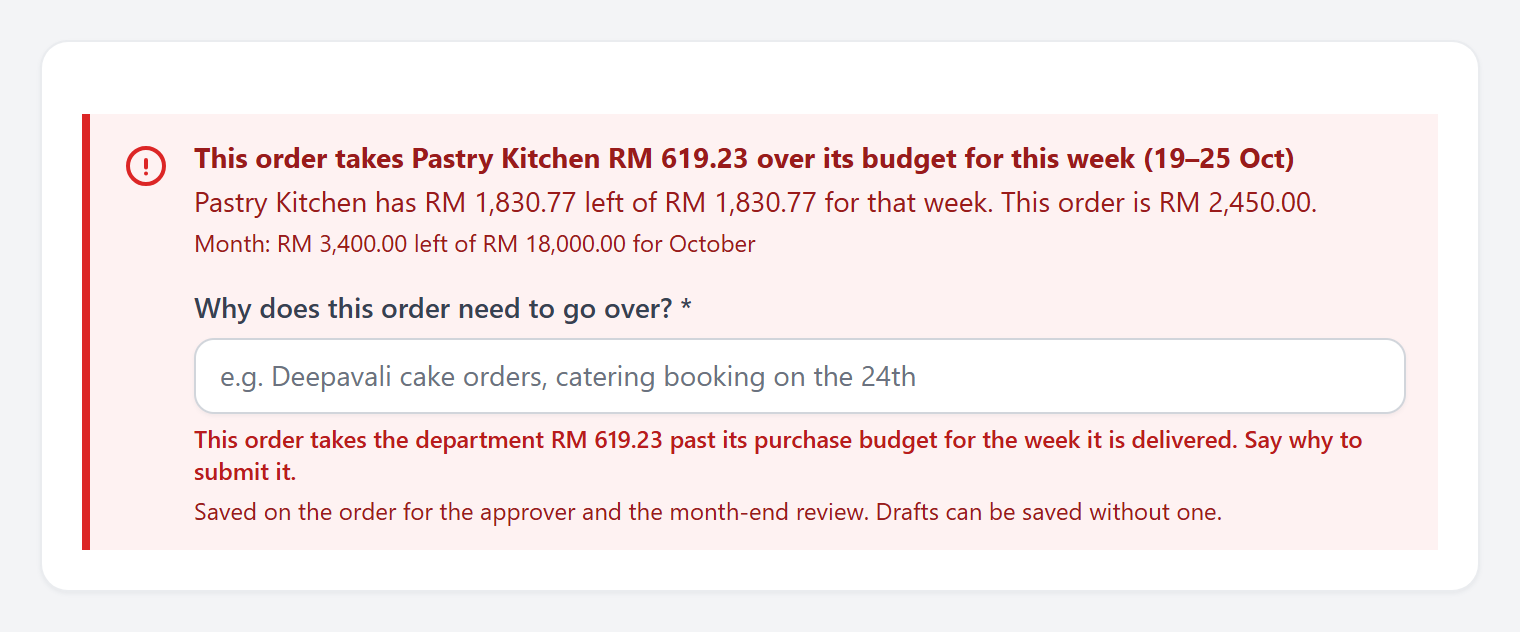
- Drafts can always be saved without a reason. The reason is asked for when you submit or approve.
- Write a real reason — "Deepavali cake orders" or "catering booking on the 24th". "Urgent" tells the reviewer nothing.
- A purchase dated in last month is last month's cost, so it is not checked against this month's budget.
Everyone who can raise purchase orders for the outlet also gets one email at 8 am on the morning a department moves to Watch, Overspending or Budget used up. It is sent when things get worse, not every day.
Your weekly routine
- Monday, after the sales import: open the Dashboard and note your department's "This week · left". That is your figure until Sunday.
- Before every order: check it fits inside "left". If it does not, cut what can wait, or be ready to give a reason.
- On every order: set the right delivery date. It decides which week the order counts in.
- Receive goods on the day they arrive. Until then the order counts as "on order", not "spent", and the badge only judges what is spent.
- Watch or a red badge: order essentials only, and tell your manager before the next big order.
Common questions
Why does this week say "spent 0"?
The week starts on Monday. Nothing has been delivered this week yet.
The card says 33.5% against a 28% target, so why is it only on Watch?
"Currently at" divides purchases by sales up to today. The badge allows for 3 days of buying ahead, because stock arrives before it is sold. Go by the badge, and read the % as an early warning.
Why did my budget change overnight?
The sales import updated the month. If sales went up, the budget went up; if they went down, it shrank. That is the point: the budget follows what the department actually sells.
Why is this week's budget so small?
The department has already spent more than it should have by now. There is less left for the rest of the month, so each week gets less. That is how the month gets back to target.
The heading warns "No sales imported since…".
The POS import has stopped, so every budget is running on an old sales rate. Import the sales, or tell your manager. The budgets catch up as soon as the sales are in.
A department has no card, or says "No sales yet".
A budget is earned from sales, so a department needs to be linked to a sales category, or set to cost against total sales. An administrator sets this in Procurement → Procurement Settings → Departments, along with each department's target cost % (the company target is used when it is left blank). If two departments share one sales category, give each its share of the sales there too.
Still stuck?
Tell us what you were trying to do — a person on our team will reply. If this guide is missing a step or out of date, say so and it gets fixed in the manual, not just in an email.